
Honeywell
Revolutionizing Urban Living
Redefining Urban Interaction through Digital Design:
The Smart Cities Initiative
Introduction
In today’s rapidly urbanizing world, cities are grappling with congestion, fragmented services, and outdated systems. Honeywell’s Smart Cities initiative emerged as a visionary response—a research-driven project that evolved into a set of high-level wireframes, designed to seamlessly integrate urban operations.
This case study chronicles the journey from in-depth research to conceptual design, demonstrating how strategic UX can transform city management for a smarter, safer, and more sustainable urban future.

Duration
6 months
Client
Honeywell
Duration
Researcher & UX Strategist
The Urban Challenge – Unpacking Complexity
Before designing a smarter interface, it was crucial to define the problem. Urban environments today are plagued by fragmented digital services that do not fully engage or inform citizens. Key issues identified include:
Fragmented Urban Operations
Cities have long suffered from disjointed systems where departments work in silos. From waste management to traffic monitoring, the lack of integration resulted in slow response times and inefficient service delivery.
Interdepartmental Coordination Issues
Municipal teams often struggled with communication hurdles—manual processes, language barriers, and inadequate digital tools created gaps that led to delays and operational errors.
Citizen Engagement and Operational Gaps
Residents were left with no centralized platform to report issues or track progress. The result? A decrease in trust and satisfaction, with critical urban challenges going unaddressed.
Project Goals
The initiative set out to:
01 Create an integrated, real-time command center.
02 Enhance incident management across domains such as traffic, waste, water, and lighting.
03 Foster seamless interdepartmental coordination and citizen engagement.
04 Leverage advanced analytics to improve operational efficiency.
Problem Statement
At its core, the project set out to answer one burning question:
"How can technology transform everyday urban experiences into smart, seamless, and engaging interactions?"
Research & Discovery
Digging into the Urban Pulse
PHASE 01
Primary Research
Field Observations
Over a 10-day period, researchers noted how citizens navigated urban spaces and interacted with existing digital kiosks.
User Interviews
In-depth discussions with city residents, public service users, and urban planners uncovered pain points and aspirations.
Usability Testing
Early prototypes were trialed in real-life settings to assess interface intuitiveness and engagement.
PHASE 02
Secondary Research
Literature & Benchmarking
Reviewed existing studies on urban digital interfaces and best practices in smart city applications.
Data Analysis
Quantitative metrics validated observational insights.
Existing Solutions & Implementations
Honeywell’s current solution is a robust, integrated command console that is already being deployed:

GIS Maps
-
Load Multiple Layers
-
Provide Search Capabilities
-
Nearby Elements/Cameras/Sensors Search
-
Third party Map Integration

Orchestration
-
Navigate seamlessly through the different screens
-
Track an incident on the map using DVM and viz.
-
Search for nearby cameras
-
From incident, see map location and associated videos

Command Console
Collaboration between HUE Bangalore and HUE Sydney
Mapping the Journey – Deep Dive into User Research
The extensive research phase focused on gathering insights from the ground up:


VOC & OVOC Studies
In-depth interviews and observations with municipal officials, control room operators, and field engineers uncovered key pain points—ranging from language barriers to outdated manual processes.
Workshops & Field Studies
Interactive workshops provided a platform for municipal leaders and urban planners to discuss real-world challenges, while field studies mapped out urban complexities.
Key Insights
Several recurring themes emerged:
Unified Communication is Critical:
The lack of integrated tools significantly delayed incident response.
Localized Urban Challenges:
Detailed city mapping revealed that each urban area has unique infrastructure issues requiring bespoke solutions.
Need for Real-Time Data:
Stakeholders emphasized the importance of real-time data visualization and predictive analytics.
Citizen Engagement:
A centralized platform for reporting and resolving issues is vital for restoring public trust.

Challenges Faced and Pain Points
The research identified numerous obstacles:
Fragmented Operations
Disconnected systems resulted in slow, error-prone responses.
Language & Tech Barriers
Many operators found current systems cumbersome, particularly due to language challenges.
Manual Tracking
Reliance on legacy systems and manual entry led to inefficiencies.
Citizen Disengagement
The absence of a unified platform left residents frustrated and disconnected from municipal services.
Limited Real-Time Visibility
Inadequate data access hampered quick decision-making.
Understanding Indian Cities – A Tapestry of Diversity
The India Smart Cities Mission
The goal of this exercise is to understand each Indian city based on various parameters that drive them.


The Government of India’s mission aims to transform 100 cities into citizen-friendly, sustainable urban hubs. This initiative provided the backdrop for our research:
01
City Profiles
Detailed profiles (e.g., Vizag’s ancient legacy vs. Ahmedabad’s industrial might) highlighted varied challenges and opportunities.
02
Economic & Cultural Context
Each city’s unique demographic, economic drivers, and cultural nuances informed tailored smart solutions.
03
Workshops & Stakeholder Engagement
Collaborative sessions with local authorities showed the need for localized, scalable tech that respects each city’s distinct identity.
What Our Cities are Asking For
Highlighting Insights from our Research

Competitor Analysis
What Other's Are Doing?
To design an effective game, A series of interviews with visitors and museum staff provided insights into expectations, frustrations, and preferences regarding museum exhibits.
Incident Management
Dashboards & Analytics
Citizen Interactions
Deployment
Developer Ecosystem
IBM's IOC
-
Workflow customizable by Standard Operating Procedure
-
Dispatch to response (field) teams
-
Collaboration with response teams
-
Operational dashboards with drill down options
-
Emergency responders readiness
-
KPI monitoring and incident heat maps
-
Grievance redressal through social media
-
Grouping of reported issues with scheduled repairs
-
Citizen broadcasts
-
On-premise as well as cloud
-
Robust and well-supported developer ecosystem
Trinity ICCC
-
End-to-end workflow customization
-
Rapid dispatch to response teams
-
Seamless collaboration across departments
-
Comprehensive dashboards with drill down capabilities
-
Focus on waste management and city demographics
-
Automated citizen reporting and issue grouping
-
Support for citizen broadcasts and social media interactions
-
Cloud and on-premise options
-
Open architecture with strong in-house GIS and GPS expertise
Personas
Building The User Personas
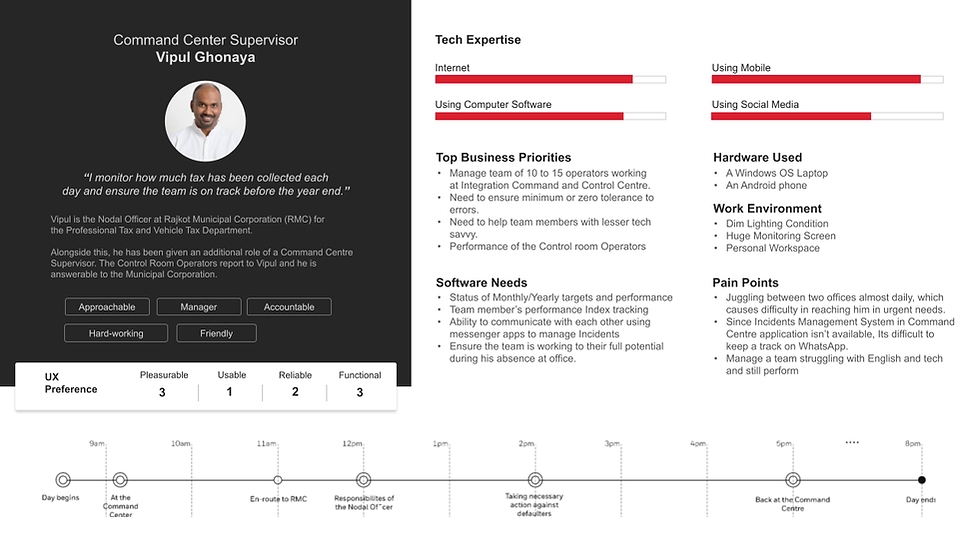

Some Secondary Personas

Ideation and Conceptualization
Some of our Journey Maps
“As-Is” vs. “To-Be” journey maps illustrate the transformative potential of the Smart Cities platform.
These maps capture:
-
Incident Response: From initial alerts to dispatch and resolution.
-
Citizen Engagement: Transitioning from fragmented, manual reporting to an integrated digital platform.
-
Operational Workflow: The shift from disjointed processes to seamless, real-time management.


Designing for Smart City CEO's Dashboard


Concept 1: Make a Solar System
-
Idea: Players arrange planets in a balanced solar system using gestures.
-
Challenge: Too abstract for younger kids; lacked a clear narrative.
High-Level Wireframes & UX Conceptualization
The Transition from Insights to Design
Building on research findings, the team moved into the design phase.
The objective was to create high-level wireframes that capture the following:
-
Alerts Landing Page: Dual views (map and list) for quick incident assessment.
-
Incident Details Panel: Visual breakdown of incident specifics, SOP guidance, and communication channels.
-
User Interaction Flows: Detailed user journeys from alert reception to incident closure.
New Concepts and Innovations
Building on the established foundation, we introduced several new concepts aimed at elevating the user experience and overall functionality:


01
Advanced SOP Designer
An intuitive, visual canvas allows users to create and modify Standard Operating Procedures (SOPs) through block-diagram representations. Auto-connected activity cards and if-else conditions simplify workflow creation, reducing errors and training time.
03
Refined Incident Detail Panels
Redesigned layouts offer richer, more accessible details—including comprehensive SOP information, evidence attachments, and real-time commentary—ensuring that users can respond more effectively to incidents.
05
Task Based Design Enhancements
Focused on intuitive interaction, these innovations emphasize ease-of-use through clear visual hierarchies and customizable views, ultimately enhancing the overall user experience.
02
Enhanced Multi-Screen Functionality
New wireframes illustrate the capability to separate video feeds and maps across different screens. This multi-screen approach enables operators to monitor various data streams simultaneously, boosting situational awareness.
04
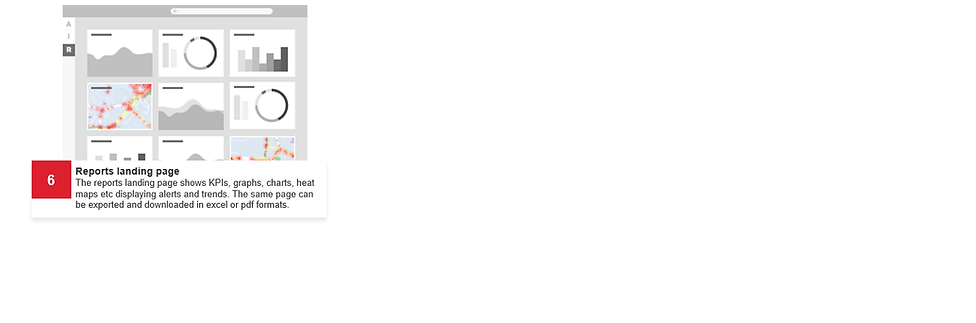
Interactive & Customizable Dashboards
The updated interface supports dynamic layering and filtering, allowing users to tailor the display to their operational needs. Enhanced iconography, color coding, and visual cues improve navigation and reduce cognitive load.
Together, these new concepts push the boundaries of the current system, creating a more adaptive, efficient, and user-friendly platform that is ready to meet the evolving demands of modern urban management.
The Design Solution – Merging Technology with Usability
UX and Technology Integration
The final design solution marries cutting-edge technology with an intuitive user experience:
-
Real-Time Analytics: Leverages IoT sensors and AI-driven insights for predictive analytics and rapid decision-making.
-
Collaborative Tools: Integrated communication channels foster seamless coordination among departments.
-
Citizen-Centric Interface: Empowers residents to report issues and stay informed through an engaging, user-friendly portal.
Execution Details - Technology Deployment and Phased Rollout
UX and Technology Integration
The final design solution marries cutting-edge technology with an intuitive user experience:
-
Real-Time Analytics: Leverages IoT sensors and AI-driven insights for predictive analytics and rapid decision-making.
-
Collaborative Tools: Integrated communication channels foster seamless coordination among departments.
-
Citizen-Centric Interface: Empowers residents to report issues and stay informed through an engaging, user-friendly portal.
Phase 1. Alert Listing and Details
Discover city alerts...easily.

Alert Listing
The list of the incoming alerts is displayed in a tabular format with the columns as Priority, Source, Type, Date & Time & Timeout.

Alert Details
Clicking on the any alert displays a detail of the alert in a panel from the right.
The panel can is used to display detailed information about the alert along with with other sections like Location & Attachments.
The Location sub-section can be pop-out of the panel and be re-purposed to be moved to a different screen if the operator is using more than one screen.
Phase 2. Incidents Listing and Details
Act on smart city alerts...quickly.

Incidents Listing
The list of the created incidents is displayed in card along with the map side-by-side.
The incident(s) listed on the right panel are also highlighted on the map along with the Source (i.e., garbage bin in the above case) icon.

Incident Details
Clicking on the any incident card displays a detail of the incident in a panel overlaying the incident listing.
The incident panel displays details of the incident with additional details like SOP Details, Evidence & Comments sections.
Phase 3. SOP Designer
Act on smart city alerts...quickly.
SOP Designer Canvas
The SOP Designer essentially consists of a canvas and config panel.
Canvas section of the SOP Designer can be visualized in block diagram and the config panel will provide contextual actions to create the flow.
If Else Condition
As per the last step an if else can be added between two cards by invoking the action by clicking on the plus ‘+’ sign.
Creating a SOP Activity
An SOP creation can be started by clicking on the Start Creating SOP button, which provide options for adding an activity.
As one activity card is added a plus ‘+’ sign is shown on the activity card to add another activity next to the current one automatically connected by a arrow.
Impact, Reflections and the Road Ahead
Measurable Outcomes
The Smart Cities platform has already demonstrated tangible benefits:
01 Reduced Response Time
Incident response improved from hours to mere minutes.
02 Operational Efficiency
Streamlined processes reduced manual effort and error.
03 Enhanced Collaboration
Integrated communication channels have fostered better interdepartmental coordination.
04 Increased Citizen Satisfaction
Direct citizen engagement channels have bolstered trust and transparency.
Conclusion: A Vision Realized Through Thoughtful Design
Honeywell’s Smart Cities initiative stands as a powerful example of how in-depth research and visionary design can converge to create transformative urban solutions.
By addressing the intricacies of urban challenges and crafting a user-centric interface, this project not only enhances operational efficiency but also redefines the citizen experience. The journey from comprehensive research to high-level wireframes demonstrates the profound impact that thoughtful UX can have on shaping the cities of tomorrow.