
Nehru Planetarium
Space Explorer
Transforming Museum Learning Through Interactive Gestures
Overview
Museums are spaces of learning, yet many exhibits remain passive and text-heavy, making it difficult to capture and sustain the attention of children. The Gesture-Based Digital Informative Game, developed for Nehru Planetarium, Delhi, sought to revolutionize museum engagement through a motion-controlled learning experience.
By integrating gesture-based interactions, the project aimed to shift museum visits from observation to participation, allowing children to explore space concepts interactively.
This project was undertaken as part of my diploma at the National Institute of Design (NID).
It involved user research, interaction design, prototyping, and testing to create an innovative gesture-based game.
Duration
~7 months
Client
Nehru Planetarium
My Role
Researcher & UX Strategist
Game & Interaction Designer
Prototyping & Implementation
The Challenge
Traditional museum exhibits rely heavily on static text, infographics, and non-interactive models, making it difficult to sustain children's interest.
Nehru Planetarium wanted to revamp its “Activity Room” with modern, interactive exhibits that would:
Be engaging for children, encouraging self-learning.
Use cutting-edge technology (gesture-based interaction).
Complement school curricula on space and astronomy.
Seamlessly integrate within the museum space.
However, designing a gesture-based game for a museum environment posed several challenges:
1.
How do we make gesture interactions intuitive for all age groups?
2.
How do we balance education and entertainment in the gameplay?
3.
What kind of space constraints and visitor behaviors must be considered in a museum setting?
Our Primary Objectives
To address these challenges, the project centered around four primary objectives:
01 Develop an interactive game that educates children about space.
02 Ensure accessibility & usability for kids of different ages.
03 Leverage Kinect technology for a controller-free experience.
04 Encourage active participation & learning through challenges.
Problem Statement
"How can we create an engaging gesture-based game that enhances learning in museum spaces while making astronomy fun and interactive for children?"
Design Process & Approach
I followed a human-centered design approach, blending research, ideation, prototyping, and testing.

Discovery & Research
Nehru Planetarium, located in Teen Murti Bhawan, Delhi, is a major center for interactive astronomy education.
The space includes:
About Nehru Planetarium
Understanding the Museum Space & Its Visitors
Sky Theatre
Dome-screened space show.
Exhibit Area
Astronomy-related interactive installations.

User Research
Studying Visitor Interaction
To design an effective game, A series of interviews with visitors and museum staff provided insights into expectations, frustrations, and preferences regarding museum exhibits.
Key Observations from Visitor Research
Children are drawn to interactive exhibits like “Did You Know?” and “History of the Universe”.
Text-heavy exhibits are largely ignored by younger visitors.
Tangible interaction elements (e.g., buttons, sliders, quizzes, hands-on activities) increase engagement
Broken or non-functional installations frustrated users.
Multiplayer & competitive elements increased engagement.
Insights from Interviewing Visitors & Museum Staff
Children’s Behavior
Kids are drawn to interactive, tactile exhibits like quizzes, sliding panels, and simulations. They prefer hands-on learning over text-heavy displays.
Popular Exhibits
The "Did You Know?" quiz and "History of the Universe" were the most engaging due to their interactive elements and visual appeal.
Parental Feedback
Parents wanted exhibits that aligned with school curricula, making it easier for kids to connect what they learned in class with the museum experience.
Stakeholder Interaction
Client Interaction for Intent Mapping
01
Director
-
Purpose: Purpose: To gain a comprehensive understanding of the museum space and exhibits, secure access to technical staff, and obtain permission to engage with visitors.
-
Outcome: Dr. Ratnashree, the Director, highlighted that the Dome Projection show “Ultimate Universe” was highly popular - primarily because it resonated with children by directly relating to their school curricula. Her input emphasized the need for interactive, educational content that could complement traditional museum exhibits.
02
Assistant of the Director
-
Purpose: Mrs. Joseph, the Director’s assistant, was consulted to gather detailed information on visitor profiles and the functionality of current exhibits.
-
Outcome: She facilitated an appointment with the museum engineer and provided insights on visitor engagement—pointing out that children, especially those in 4th standard and above, were the primary audience drawn to interactive displays and dynamic presentations.
03
Planetarium Engineer
-
Purpose: To understand the technical aspects and operational challenges of existing exhibits.
-
Outcome: Mr. O.P. Gupta, the Planetarium Engineer, shared details about the museum’s technical setup. He explained that early projectors were manually operated and that content was created in-house to ensure simplicity for lay audiences. He also noted the high usage of interactive installations such as the weighing pan (despite its current malfunction) and the “Did You Know” quiz, reinforcing the importance of tactile and engaging exhibits.
Understanding the Planetarium & Its Challenges
The Space: Analyzing Existing Exhibits
The Nehru Planetarium features a diverse range of exhibits designed to engage visitors with astronomy, space science, and historical astronomical discoveries. These exhibits vary in interactivity, content format, and learning objectives. Below is a detailed breakdown of some of the key exhibits, their intent, user engagement, and media tools used.
Types of Exhibits & the Learning Intentions
The exhibits at the Nehru Planetarium fall into four main categories:
-
Interactive Exhibits – Engaging activities that allow hands-on exploration.
-
Informational Displays – Static visuals with descriptive texts and images.
-
Digital/Projection-Based Exhibits – Screens, animations, and videos providing immersive experiences.
-
Real Space Artifacts – Authentic space-related objects on display.
Some Key Exhibits & Their Experiences (4 of 14 Exhibits)
1. Why the Night Sky is Dark?
-
Intent: Explains the paradox of why the sky appears dark despite infinite stars.
-
User Experience: Visitors peek through windows to see a simulated night sky.
-
Media Used: Light & graphics installation.
3. Soyuz T-10 Descent Module
-
Intent: Displays the actual spacecraft capsule used by India’s first astronaut, Rakesh Sharma.
-
User Experience: Non-interactive – Visitors observe the charred descent module from re-entry.
-
Media Used: Physical space capsule, text descriptions.
2. Seeing is Believing
-
Intent: Explains the transition from geocentric to heliocentric models of the universe.
-
User Experience: Interactive – A mechanical solar system model moves planets around the sun when activated.
-
Media Used: Text, infographics, electromechanical model.
4. History of the Universe
-
Intent: Displays a timeline of cosmic evolution from the Big Bang to modern times.
-
User Experience: Interactive – Users slide a panel to reveal different stages of universe formation.
-
Media Used: Infographics, text, interactive sliding panel.
Exhibits That Worked Well
"Did You Know?" Quiz →
Popular due to its question-and-answer format.
“History of the Universe" Panel →
Attracted visitors because of its interactive sliding
Exhibits That Failed to Engage
Text-Heavy Information Boards →
Ignored by younger visitors due to lack of interactivity.
Static Space Models →
Observed briefly, then abandoned because they lacked interactive elements.
Ideation and Explorations
Defining The Problem
How Might We Create an Interactive Experience That Educates and Engages?
Based on the research, we identified the following design goals:
-
Interactive Learning: The game should allow kids to explore space concepts through gestures and movement.
-
Edutainment: Combine education with entertainment to keep kids engaged.
-
Intuitive Controls: Use natural gestures that are easy to learn and perform.
-
Immersive Experience: Create a realistic simulation of the solar system to spark curiosity and wonder.
User Personas
Who Will Use This Game?
To create a game that resonates with visitors, four personas were developed based on real and archetypal users.
Real Persona (based on actual visitors)
Jyoti
The Guardian & Educator
35 Years
Graduation, B.A.
Female
Homemaker
Hobbies/Interests
Spending time with kids, reading, watching TV, Bollywood movies
Technology Familiarity
Uses a smartphone and a computer for household transactions.
Behavior at the Planetarium
-
Accompanies children on museum visits
-
Prefers exhibits that educate while entertaining
-
Reads information panels and explains them to kids
-
Values interactive elements that help children learn through play
Shobhit
The Digital Native & Gamer
13 Years
9th Standard
Male
Student
Hobbies/Interests
Playing cricket and football, watching movies (Bollywood & Hollywood), reading GK books, web surfing
Technology Familiarity
Very tech-savvy, plays computer games extensively, knows how to find and download new games.
Behavior at the Planetarium
-
Prefers game-like interactions over static displays
-
Enjoys competition-based exhibits with scoring systems
-
Knows how to use smartphones but does not own one
-
Wants to be a scientist and admires Tony Stark (Iron Man)
Persona (designed for game testing)
Jyoti
The Guardian & Educator
11 Years
7th Standard
Female
Student
Hobbies/Interests
Playing, reading storybooks, watching movies, singing
Technology Familiarity
Limited computer knowledge, only uses Turtle software (taught in school).
Behavior at the Planetarium
-
Loves reading story-driven content but finds math and science difficult
-
Engages better with visual storytelling and interactive narratives
-
Enjoys cartoon-style animations and hands-on experiences
Shobhit
The Digital Native & Gamer
15 Years
11th Standard
Female
Student
Hobbies/Interests
Facebook, reading novels and magazines, watching movies
Technology Familiarity
Heavy internet user, owns a phone, uses the web extensively for studies.
Behavior at the Planetarium
-
Engages in social learning (likes to share experiences with friends)
-
Academically strong but uncertain about career choices
-
Prefers exhibits that have a digital or social media integration aspect
Making Learning Fun
Game Concept Development
Prioritizing Features for the Game Development
Must Have
(Critical for the Game’s Functionality & Experience)
-
Gesture-Based Interaction for Hands-Free Control
-
The game must use gesture and movement-based input, eliminating physical controllers.
-
This ensures durability in a high-traffic museum environment while providing intuitive control for players of all ages.
-
-
Educational Gameplay Integrated with School Curriculum
-
The content should be aligned with textbooks and reinforce concepts taught in schools.
-
Parents and Planetarium staff emphasized that the game must deliver scientific information through play.
-
-
Simulation-Based Environment Reflecting Space & Planetary Movement
-
The game world should simulate space in real-time, featuring planets, the sun, and celestial phenomena.
-
Children are drawn to real-world space objects (e.g., space suits, capsules), making an interactive simulation essential.
-
-
Thrill, Challenge, and Strategy as Core Gameplay Elements
-
The visuals, obstacles, and game mechanics must engage users by introducing:
-
Thrill: High-quality graphics and dynamic space travel.
-
Challenge: Navigating through cosmic obstacles and completing missions.
-
Strategy: Encouraging players to apply knowledge to solve in-game challenges.
-
-
-
Immediate & Instantaneous Gesture Feedback
-
Real-time response is crucial for maintaining immersion.
-
Any delays in gesture recognition would break the seamless connection between the real and virtual worlds.
-
Should Have
(Enhancements That Improve the Experience but Are Not Mandatory)
-
Embedded Learning Through Game Progression
-
Information should be woven into the game itself, rather than delivered in separate text-based formats.
-
Players should “discover” knowledge by interacting with space objects rather than being forced to read long explanations.
-
-
Adaptive Difficulty & Personalized Challenges
-
As players progress, the game should adjust difficulty levels dynamically to match their skills.
-
This ensures engagement across different age groups and prevents frustration.
-
-
Multi-User or Team-Based Play
-
While the game was designed primarily for single-user experiences, a collaborative or competitive mode would enhance its educational value.
-
For example, players could work together to complete missions or compete in astronomy-based challenges.
-
Could Have
(Additional Features That Would Enhance Engagement)
-
Augmented Reality (AR) Elements for a More Immersive Experience
-
The inclusion of AR overlays could allow players to explore space-related information outside the game (e.g., scanning QR codes on exhibits).
-
-
Expanded Game Missions Featuring Space Exploration History
-
Missions could cover real-life space events, such as the Apollo landings or Mars rover missions, blending real-world history with interactive gameplay.
-
-
Customizable Avatars & Spaceships
-
Players could modify their spacecraft or astronaut avatar for personalized engagement.
-
Won't Have
(Features That Are Out of Scope for This Version)
-
Full Virtual Reality (VR) Integration
-
VR requires specialized hardware, making it inaccessible to all museum visitors.
-
Instead, the game will focus on gesture-based immersion rather than full VR environments.
-
-
Extensive Narrative-Based Gameplay
-
The focus is on simulation and exploration, not long-form storytelling.
-
While some narrative elements will be included, the game will not have a deep, complex storyline like RPGs.
-
-
Highly Complex Gestures or Multi-Layered Interactions
-
Gestures should be simple, intuitive, and easily executable by both children and adults.
-
Overcomplicated gesture controls would alienate older players who might feel uncomfortable performing exaggerated movements in public.
-
Concept 1: Make a Solar System
-
Idea: Players arrange planets in a balanced solar system using gestures.
-
Challenge: Too abstract for younger kids; lacked a clear narrative.
Content Mapping
The Content

The Proposed Exhibits

Brainstorming the Game Concept
We explored several game concepts, focusing on solar system exploration and space travel.

.png)
Concept 1: Make a Solar System
-
Idea: Players arrange planets in a balanced solar system using gestures.
-
Challenge: Too abstract for younger kids; lacked a clear narrative.
.png)
Concept 2: Space Traveler
-
Idea: Players navigate a spaceship through the solar system, answering questions to progress.
-
Challenge: Overly complex; risked losing the playful aspect.
.png)
Concept 3: Space Explorer
-
Idea: Players control a spaceship, traveling through the solar system to explore planets.
-
Why It Worked: Simple, intuitive, and aligned with the museum’s educational goals.
From Concept to Reality
Prototyping and Iteration
I developed three prototypes, each refining the game’s mechanics, gestures, and user interface.
Prototype 1 - The Proof of Concept
Objective of the First Prototype
The first prototype aimed to validate core game concepts and technology feasibility, focusing on:
Selecting the right game engine for both this and future prototypes.
Defining basic gestures: moving forward, turning left, and turning right.
Ensuring accurate gesture tracking and mapping physical movements to digital controls.
Summary
Goal: Validate gesture tracking and basic spaceship controls.
Gestures: Extended arms for forward movement, left/right arm movements for turning.
Outcome: Gesture tracking worked, but the movement felt rigid and unnatural.


Understanding Kinect Sensors

Technology & Game Engine Selection
After evaluating multiple options, Microsoft XNA Game Studio was chosen due to:
Compatibility with Windows XP and later versions.
Customizability through scripting & C# support.
Seamless integration with Microsoft Kinect SDK, enabling precise gesture tracking.
Why Kinect?
Kinect’s depth sensor, RGB camera, and multi-array microphone enabled full-body tracking, making it ideal for gesture-based gaming.
It could track up to six players and provide real-time motion recognition.

Gesture Sensitivity Issues:
-
Early testing revealed latency in gesture recognition, leading to refinements in sensitivity and tracking range.
-
Younger children struggled with wide-arm gestures, prompting adjustments in movement detection.
Increase Comfort Levels:
-
A 3D spaceship model was created to test how accurately gestures translated into movement.
-
The goal was to ensure real-time feedback, allowing players to feel fully in control of their actions.
Prototype 2
Prototype Description
The second prototype aimed to refine gameplay mechanics, enhance realism, and improve gesture recognition while overcoming technical limitations from the first prototype.
Expanded gesture controls for better spaceship movement.
Transitioned to Unity 3D for better asset management and visualization.
Refined motion tracking for more realistic space navigation.

Game System Components
The game system was structured into four key elements:
01
Objects → Sun, planets, spaceship, asteroids, space fog, background sky.
02
Attributes → Each object had properties (e.g., the Sun was stationary & a light source, planets moved in fixed orbits).
03
Internal Relationships → Defined how objects interacted (e.g., the spaceship collides with planets if too close).
04
Environment → A 3D space setting with a starfield, nebulae, and galaxies to create realism.
Game Environment Setup
The game system was structured into four key elements:
Switched to Unity 3D → Improved asset management & visual editing.
Enhanced lighting & camera setup → The Sun provided dynamic lighting, and a dual-camera system ensured a realistic space simulation.
Game Control Gestures: Refinements & New Additions
1
Initial Gestures
(from first prototype)
-
Extend arms forward → Move forward.
-
Move extended arms left/right → Turn spaceship left/right.
2
Newly Added Gestures
(in Second Prototype)
-
Extend arms downward → Pitch spaceship downward.
-
Extend arms upward → Pitch spaceship upward
3
Movement
Refinements
-
Introduced Yaw, Roll, and Pitch movements → Made spaceship movement more fluid & natural.


Key Takeaways & Challenges:
-
Realistic spaceship movement was achieved with new gesture mappings.
-
Solar system simulation was nearly complete (asteroid belt addition pending).
-
Game environment was fully set up, with space, lighting, and object physics.
Challenges & Areas for Improvement:
-
Players felt directionless in 3D space → Mini-map feature needed.
-
Gestures, though functional, weren’t intuitive for younger children.
-
Game needed a UI system for statistics (e.g., speed, time remaining, next target).
Prototype 3 - Iterations, Summary & Key Highlights
Prototype Overview & Game Flow
The third prototype focused on refining the game interface, improving gesture controls, and enhancing user experience.
01
New Home Screen & Training Mode: Users could now select Start (play the game) or Train (learn spaceship controls).
02
Gameplay Enhancements: A HUD (Heads-Up Display) provided real-time information (time remaining, speed, next destination).
03
Mission-Based Navigation: Players followed diamond blips near planets to reach their target destinations.
04
End Conditions: The game ended when time ran out, the spaceship was destroyed, or all objectives were completed.
Refining Gesture Controls & Spaceship Movement
New Gesture Enhancements
Forward Movement: Initially mapped to extending one arm forward, later refined to holding both arms forward (like gripping a steering wheel) for better speed control.
Turning Left/Right (Yaw & Roll): Early versions used arm movements; final version adopted swaying left/right for more natural navigation.
Pitching Up/Down:
-
Initial attempts used hand movements but were not intuitive.
-
Final version used the Psi Pose (raising arms up/down) for better accuracy.
New Feature - Shooting
Introduced to clear asteroid obstacles from the spaceship’s path.
Mapped to extending arms forward, similar to a flapping bird motion (Phoenix metaphor).
User Interface (UI) & Typography Enhancements
The game system was structured into four key elements:
-
UI Overhaul: Improved button placements, information layout, and typography choices.
-
Font Selection:
-
Primary font: "Bitshumishi" (used for all titles and text).
-
Secondary font: "7-Segment" (used for in-game numeric values like speed & time).
-
-
Color Scheme Revision:
-
Initially orange/yellow, but switched to blue for a modern sci-fi aesthetic.
-
.png)
Bitshumishi, final font for the Game UI
.png)
A color analysis of the UI Elements used in games and movies
.png)
7-Segement, for the Game UI; mostly numeric elements
Before:

The Home Screen which gives the user the option to start the game.

The list of the destinations to reached by the Spaceship in the given time. The speed bar and the time bar can be seen on either sides.

The spaceship chasing the destination i.e., Neptune; moving thorugh the planets and orbits.
After

The Home Screen displaying the buttons to Train and Start.
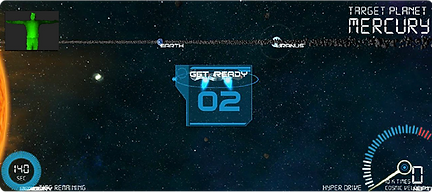
The gameplay scene, displaying the HUD elements, like the countdown timer, the Target Planet (the destination), the gauges which display the speed and the remaining time.

The Time Up window which is displyed when the user runs out of time.

The infocard for the planets, whcih displays the information for each planets.

The window which displays instructions for the user to follow, this displays the information for the user to move the spaceship up and down using a specified gesture.
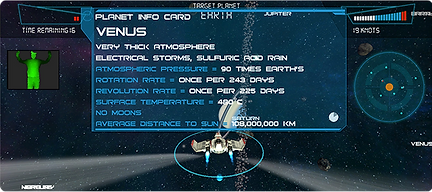
A change in the layout of the HUD elements displaying gauges in a compact layout, this change was done to make more room for the user to enjoy the 3D visuals and removing the clutters from the view.

The use of the compact layout to unclutter screen elements and displaying the important information taking more space in the foreground as the case of displaying the Time’s Up info in the above screenshot.
Key Takeaways & Challenges:
-
Game flow became more structured with improved training and navigation.
-
Gesture controls were optimized for better usability and accuracy.
-
HUD and UI refinements improved game accessibility and immersion.
Challenges & Areas for Improvement:
-
Players still felt directionless at times → Mini-map integration needed.
-
Some gestures required further refinements for younger children.
User Testing and Feedback
Testing with the Target Audience
20
Participants (children) between the ages of 9-15
-
After initial prototyping, user testing was conducted with children from different age groups (9-15) to evaluate:
-
Ease of understanding gestures
-
Effectiveness of game mechanics
-
Level of engagement and learning
-
Key Findings:
-
Gestures: Kids quickly learned and performed the gestures, especially after observing others.
-
Engagement: The realistic simulation and interactive elements kept kids engaged.
-
Educational Value: Kids remembered planet names and facts after playing.
-
Improvements: The mini-map was underutilized; kids relied more on planet labels for navigation.
Nuances in Testing:
-
Age Differences: Younger kids (7–9) struggled with the pitching gesture, requiring additional practice.
-
Group Dynamics: Kids often collaborated, guiding each other through the game. This highlighted the importance of multiplayer support in future iterations.
-
Technical Issues: Some users experienced lag during peak usage, prompting us to optimize the game’s performance further.
Final Design
Space Explorer: A Journey Through the Solar System
The final game allowed players to:
-
Control a Spaceship: Using intuitive gestures for movement, turning, and shooting.
-
Explore Planets: Travel through a realistic 3D solar system, learning about each planet.
-
Complete Challenges: Reach destinations within a time limit, adding a layer of challenge and excitement.
Key Features
1
Gesture Controls
Simple, natural gestures for movement and interaction.
2
Educational Content
Planet info cards with facts about size, distance from the sun, and more.
3
Immersive Graphics
High-quality visuals and a starry backdrop created a sense of wonder.
Highlights in Final Design
Educational Alignment
The game’s content was carefully curated to align with school curricula, ensuring relevance for teachers and parents.
Accessibility
Gestures were designed to be inclusive, accommodating kids of different physical abilities.
Scalability
The game was designed to run on low-cost hardware, making it accessible to other museums and educational institutions.
Impact and Takeaways
Transforming Museum Learning
The Space Explorer game successfully transformed the museum experience by:
-
Engaging Kids: Making learning about space fun and interactive.
-
Encouraging Collaboration: Kids worked together to complete challenges.
-
Aligning with Curriculum: Reinforcing concepts taught in school.
Lessons Learned
-
Simplicity is Key: Intuitive gestures and clear objectives are crucial for engaging young users.
-
Balance Education and Fun: Edutainment works best when learning is seamlessly integrated into gameplay.
-
Iterate and Test: User feedback is invaluable for refining the design.
Visuals and Media
Concept Video
Testing Video
Conclusion
The Space Explorer project demonstrated how gesture-based technology can revolutionize museum learning. By combining interactive gameplay with educational content, we created an experience that not only engaged kids but also deepened their understanding of space and astronomy.