Overview
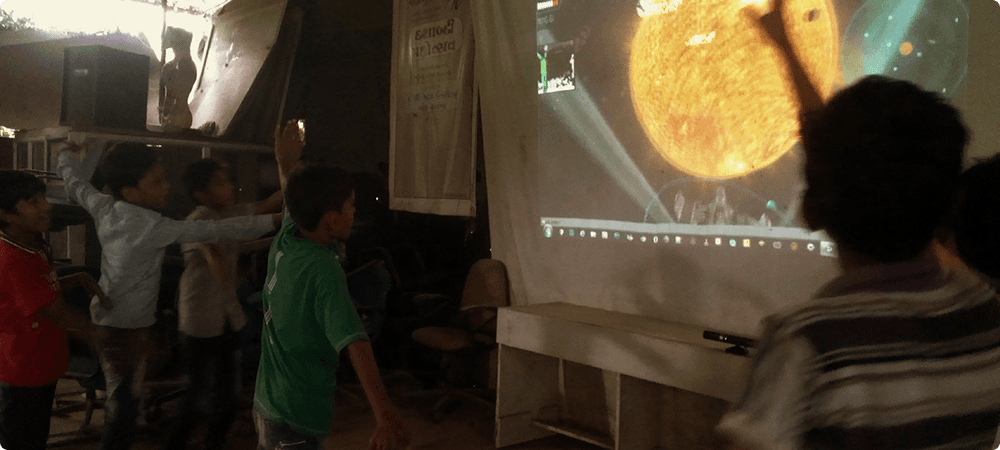
Museums are spaces of learning, yet many exhibits remain passive and text-heavy, making it difficult to capture and sustain the attention of children. The Gesture-Based Digital Informative Game, developed for Nehru Planetarium, Delhi, sought to revolutionise museum engagement through a motion-controlled learning experience.
By integrating gesture-based interactions, the project aimed to shift museum visits from observation to participation — allowing children to explore space concepts interactively. This project was undertaken as part of my diploma at the National Institute of Design (NID), involving user research, interaction design, prototyping, and testing to create an innovative gesture-based game.
The Challenge
Traditional museum exhibits rely heavily on static text, infographics, and non-interactive models — making it difficult to sustain children's interest. Nehru Planetarium wanted to revamp its “Activity Room” with modern, interactive exhibits.
The planetarium wanted exhibits that would:
Be engaging for children, encouraging self-learning.
Use cutting-edge technology — specifically gesture-based interaction.
Complement school curricula on space and astronomy.
Seamlessly integrate within the museum's physical space.
Key design questions
Gesture intuitiveness How do we make gesture interactions intuitive for all age groups?
Education vs entertainment How do we balance education and entertainment in the gameplay?
Museum constraints What space constraints and visitor behaviours must be considered in a museum setting?
Interactive Education
Develop an interactive game that educates children about space through play.
Accessibility & Usability
Ensure accessibility and usability for kids of different ages and physical abilities.
Controller-Free Experience
Leverage Kinect technology for a fully controller-free, gesture-based experience.
Active Participation
Encourage active participation and learning through challenges and exploration.
How can we create an engaging gesture-based game that enhances learning in museum spaces while making astronomy fun and interactive for children?
Design Process & Approach
A human-centred design approach was followed, blending research, ideation, prototyping, and iterative testing.
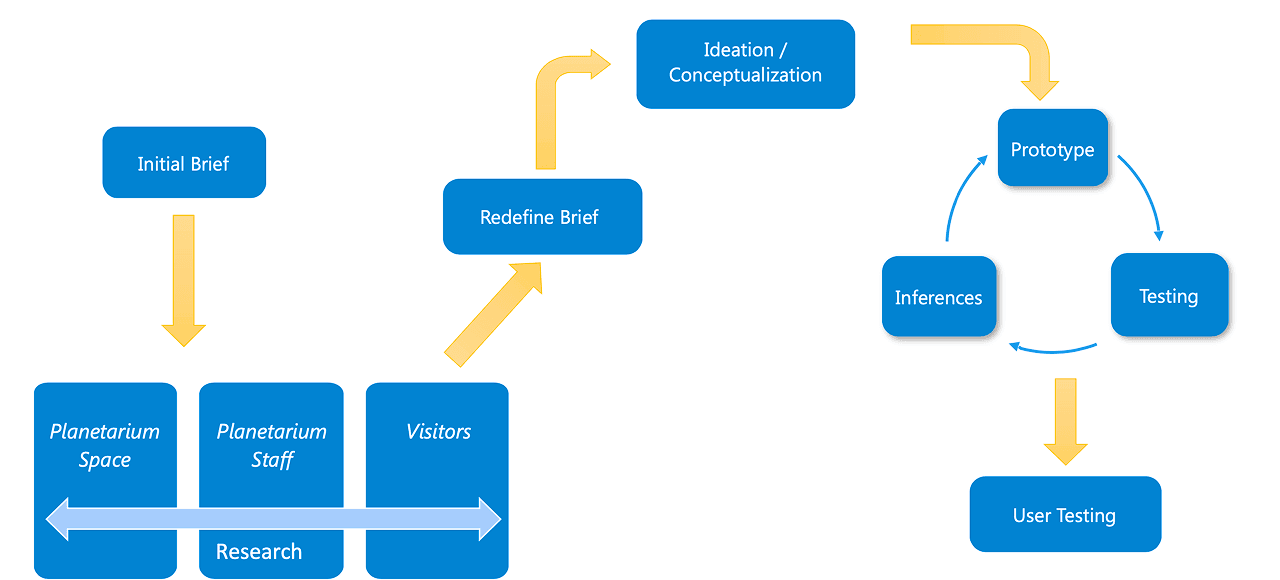
Design process — research → ideation → prototyping → testing → refinement
Discovery & Research
The Space
Understanding Nehru Planetarium
Nehru Planetarium, located in Teen Murti Bhawan, Delhi, is a major centre for interactive astronomy education. The space includes a Sky Theatre (dome-screened space show) and an Exhibit Area (astronomy-related interactive installations).
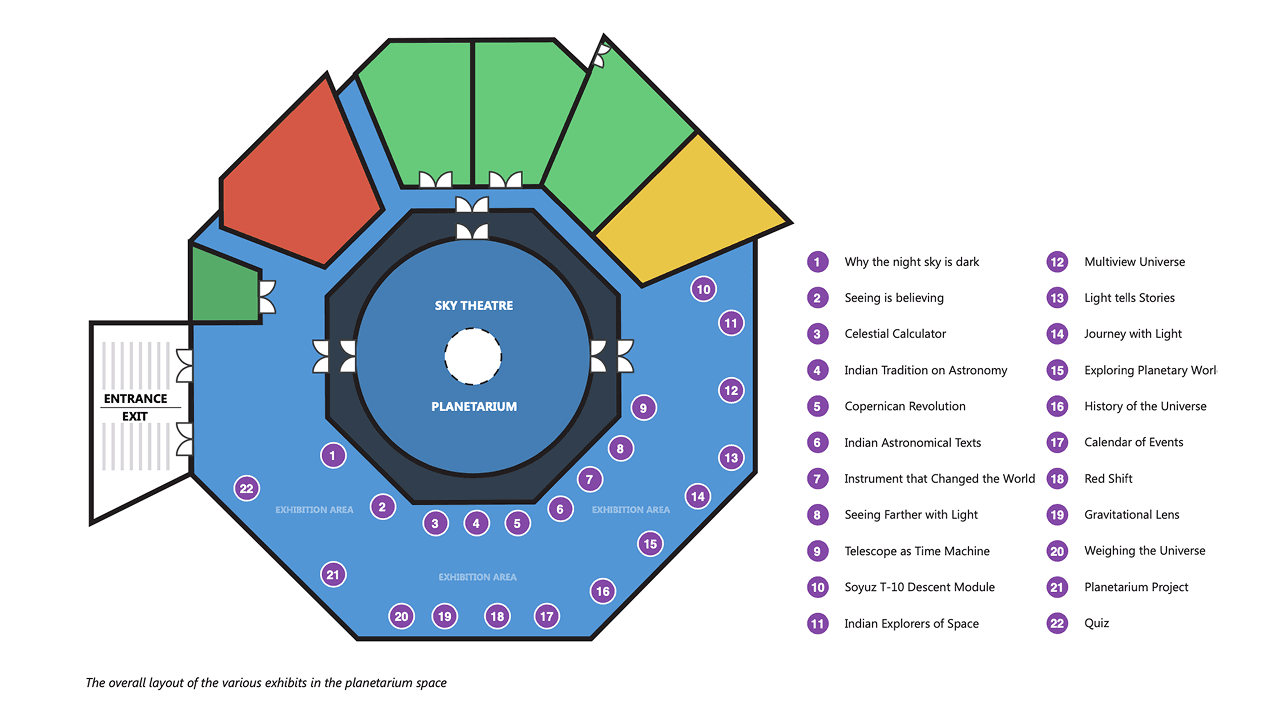
Nehru Planetarium layout — Sky Theatre, Exhibit Area, and Activity Room
User Research
Studying Visitor Interaction
Key observations from visitor research
Children are drawn to interactive exhibits like 'Did You Know?' and 'History of the Universe'.
Text-heavy exhibits are largely ignored by younger visitors.
Tangible interaction elements — buttons, sliders, quizzes, hands-on activities — significantly increase engagement.
Broken or non-functional installations frustrate users and damage trust.
Multiplayer and competitive elements increase engagement considerably.
Stakeholder Interviews
Client Interaction for Intent Mapping
Dr. Ratnashree — Director
Purpose
Gain comprehensive understanding of the museum space, secure access to technical staff, and obtain permission to engage with visitors.
Outcome
Highlighted that 'Ultimate Universe' dome show was highly popular — primarily because it resonated with children by directly relating to their school curricula. Emphasised need for interactive educational content.
Mrs. Joseph — Asst. to Director
Purpose
Gather detailed information on visitor profiles and functionality of current exhibits.
Outcome
Facilitated appointment with museum engineer and provided insights on visitor engagement — pointing out children in 4th standard and above were the primary audience drawn to interactive displays.
Mr. O.P. Gupta — Engineer
Purpose
Understand technical aspects and operational challenges of existing exhibits.
Outcome
Shared details about the museum's technical setup. Noted high usage of interactive installations like the weighing pan and 'Did You Know' quiz — reinforcing importance of tactile exhibits.
Exhibit Analysis
Some Key Exhibits & Their Experiences (4 of 14)
The Nehru Planetarium features exhibits across four categories: Interactive, Informational Displays, Digital/Projection-Based, and Real Space Artifacts. Below are four key exhibits analysed for intent, experience, and engagement.
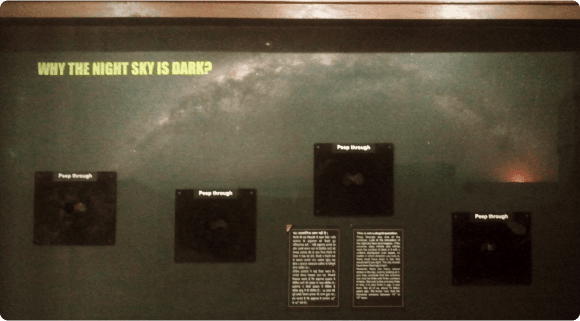
Why the Night Sky is Dark?
Intent
Explains the paradox of why the sky appears dark despite infinite stars.
Experience
Interactive peek-through windows showing a simulated night sky.
Media
Light and graphics installation
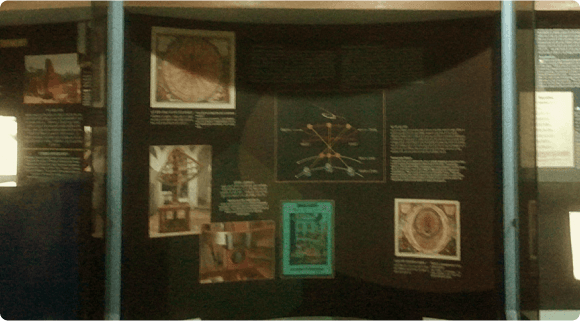
Seeing is Believing
Intent
Explains the transition from geocentric to heliocentric models of the universe.
Experience
Mechanical solar system model activated by visitors.
Media
Text, infographics, electromechanical model
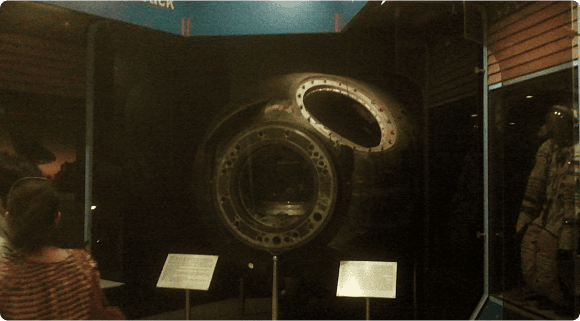
Soyuz T-10 Descent Module
Intent
Displays India's first astronaut's actual spacecraft capsule.
Experience
Non-interactive observation of the charred descent module.
Media
Physical space capsule with text descriptions
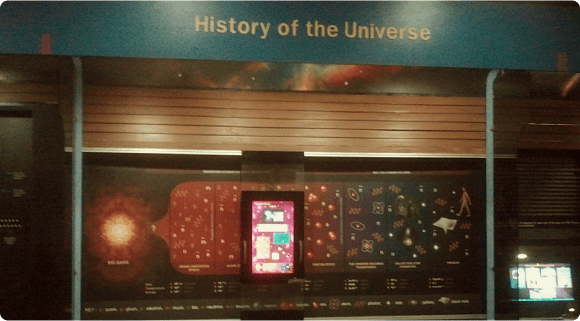
History of the Universe
Intent
Displays a timeline of cosmic evolution from the Big Bang to modern times.
Experience
Interactive sliding panel revealing different universe formation stages.
Media
Infographics, text, interactive sliding panel
Exhibits That Work Well
'Did You Know?' Quiz
Question-and-answer format — interactive, competitive, immediately rewarding.
'History of the Universe' Panel
Interactive sliding panel reveals cosmic evolution — tactile and progressive.
'Why the Night Sky is Dark?' Windows
Peek-through windows make an abstract concept tangible and participatory.
'Seeing is Believing' Orrery
Visitor-activated mechanical model makes the heliocentric shift visceral.
Exhibits That Failed to Engage
Soyuz T-10 Descent Module
Static artifact with no interaction — children glanced and moved on despite its historical significance.
Text-Heavy Information Boards
Dense copy ignored by younger visitors — no interactive hook to hold attention.
Static Scale Models
Lacked interactive elements — observed briefly then abandoned.
Non-Functional Installations
Broken or inactive exhibits frustrated users and damaged trust in the space.
Ideation and Explorations
Personas
Who Will Use This Game?
Four personas were developed based on real and archetypal users to ground the design in the actual diversity of museum visitors.
Jyoti — The Guardian & Educator
Homemaker · 35 yearsAccompanies children on museum visits. Prefers exhibits that educate while entertaining. Reads information panels and explains them to kids. Values interactive elements that help children learn through play.
Goals
- Exhibits aligned with school curriculum
- Clear educational value
- Safe, supervised interaction
Pain Points
- Broken or non-functional installations
- Text-heavy displays hard to explain to kids
- No clear learning outcome
Shobhit — The Digital Native
Student · 13 years · 9th StandardVery tech-savvy, plays computer games extensively. Prefers game-like interactions over static displays. Enjoys competition-based exhibits with scoring systems. Wants to be a scientist and admires Tony Stark (Iron Man).
Goals
- Competitive scoring and challenges
- Game-like interaction model
- Realistic space simulation
Pain Points
- Non-interactive or static exhibits
- No challenge or progression
- Overly simplified content
Game Testing
Personas Designed for Game Testing
Jyoti — The Curious Learner
Student · 11 years · 7th StandardStudent with limited computer knowledge who loves reading story-driven content but finds math and science difficult. Responds better to visual storytelling and interactive narratives.
Goals
- Visual, story-driven interactions
- Simple, guided gameplay
- Fun way to explore science topics
Pain Points
- Complex controls or too many instructions
- Abstract concepts without visual support
- No clear narrative or progression
Shobhit — The Social Explorer
Student · 15 years · 11th StandardHeavy internet user who owns a phone and engages in social learning — likes to share experiences with friends. Academically strong but uncertain about career direction. Prefers exhibits with digital or social media integration.
Goals
- Shareable, social gameplay moments
- Academically relevant content
- Digital-native interaction patterns
Pain Points
- Overly simplistic or childish content
- No social or multiplayer element
- Dated or non-digital experiences
Prioritisation
MoSCoW Feature Prioritisation
Gesture-Based Interaction for hands-free control · Educational Gameplay integrated with school curriculum · Simulation-Based Environment reflecting real space · Thrill, Challenge, and Strategy as core gameplay elements · Immediate gesture feedback with no perceptible latency.
Embedded learning through game progression · Adaptive difficulty and personalised challenges · Multi-user or team-based play mode.
Augmented Reality (AR) elements · Expanded missions covering space exploration history · Customisable avatars and spaceships.
Full Virtual Reality (VR) integration · Extensive narrative-based RPG-style gameplay · Highly complex or multi-layered gesture controls.
Content Mapping
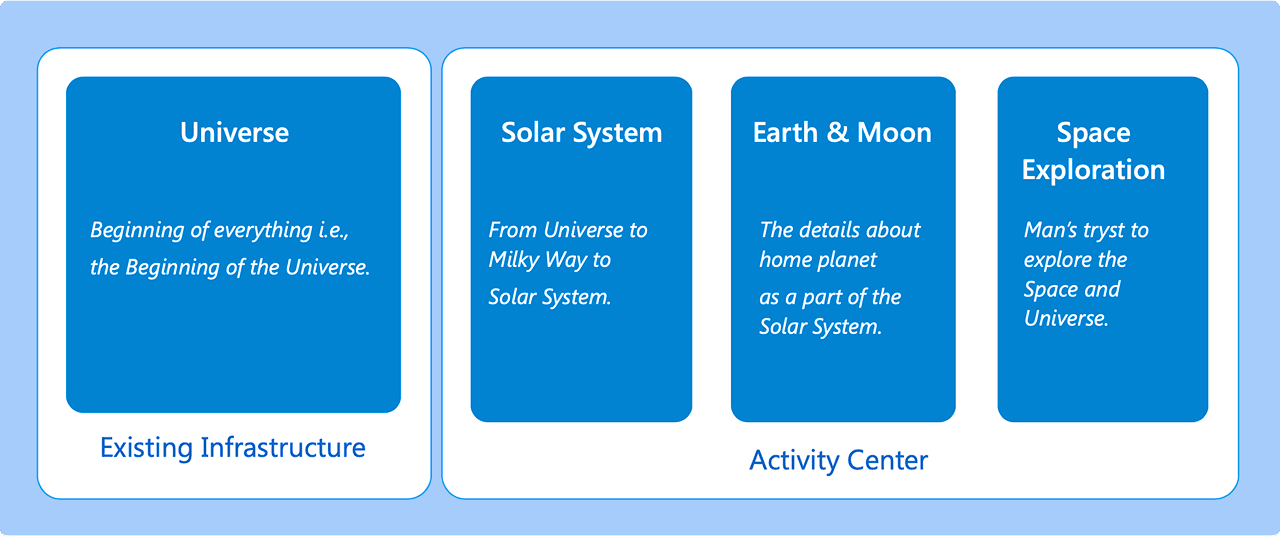
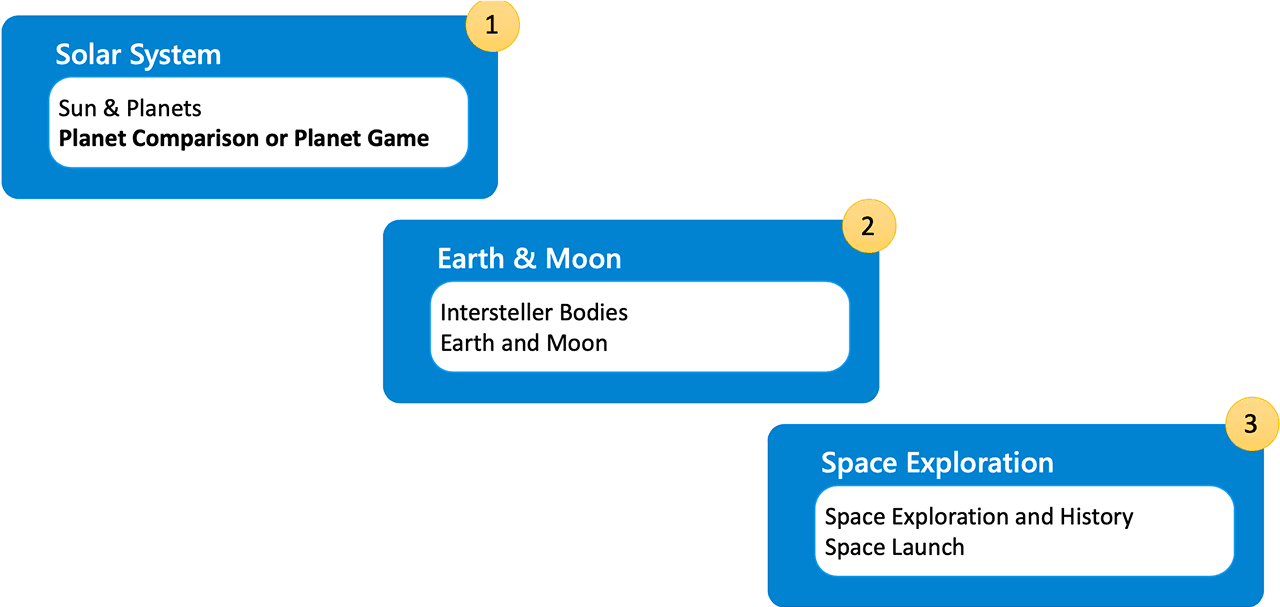
Content mapping — space curriculum topics mapped to interactive game mechanics
Proposed exhibits — Space Explorer positioned within the Activity Room
Game Concept
Brainstorming the Game Concept
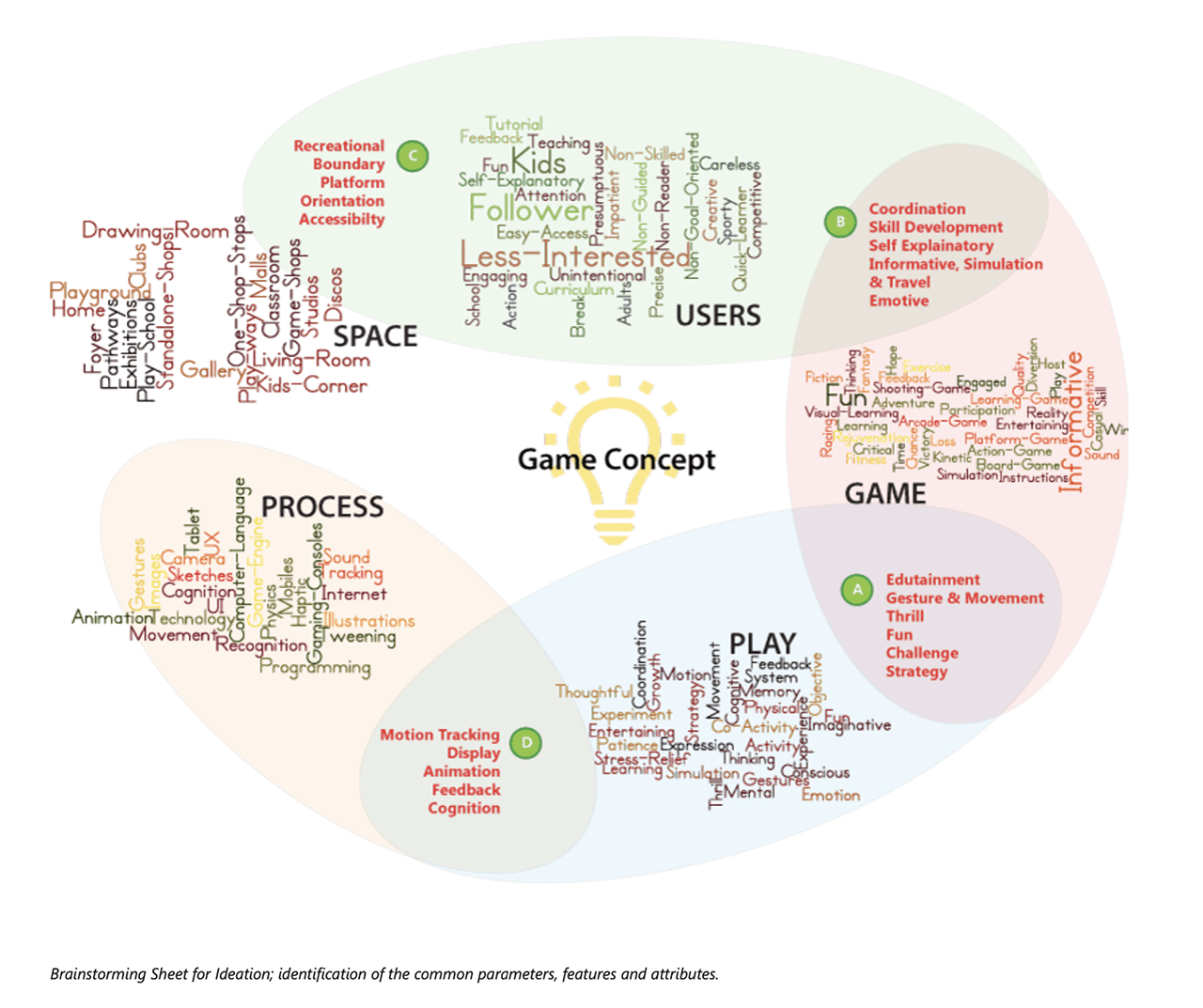
Brainstorming — exploring solar system exploration and space travel concepts
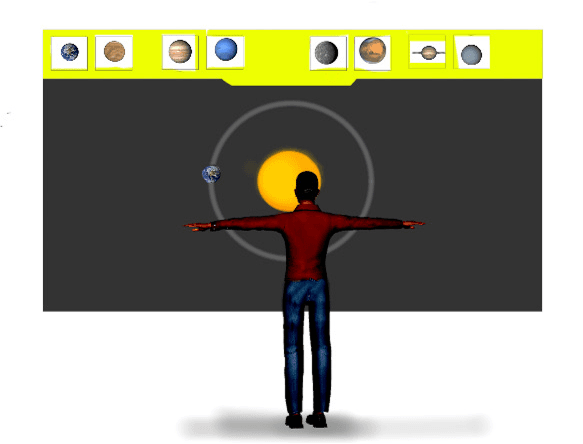
Make a Solar System
Idea
Players arrange planets in a balanced solar system using gestures.
Issue
Too abstract for younger kids — lacked a clear narrative or goal.
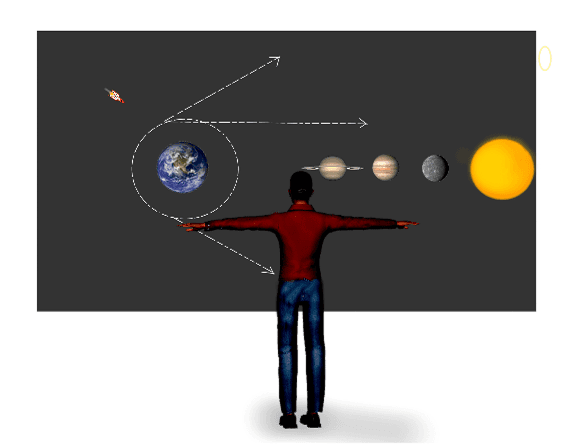
Space Traveler
Idea
Players navigate a spaceship through the solar system answering questions to progress.
Issue
Overly complex — risked losing the playful, exploratory aspect.
Space Explorer
Idea
Players control a spaceship travelling through the solar system to explore planets.
Why Chosen
Simple, intuitive, and perfectly aligned with the museum's educational goals.
Prototyping and Iteration
Three prototypes were developed, each progressively refining game mechanics, gesture controls, and the user interface.
Prototype 1
Proof of Concept
Prototype 1 objectives
Game engine selection Selecting the right engine for both this and future prototypes.
Basic gesture definition Defining core gestures: moving forward, turning left, and turning right.
Gesture mapping validation Ensuring accurate gesture tracking and mapping physical movements to digital controls.
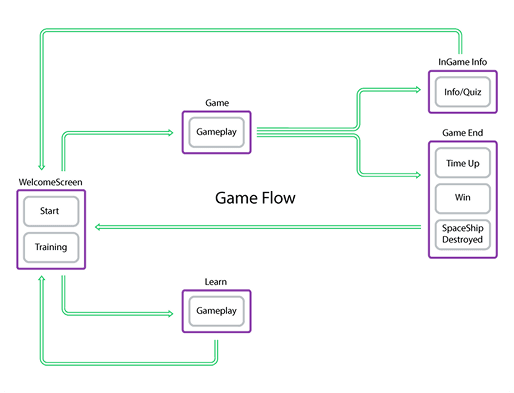
Game flow diagram — initial spaceship movement logic
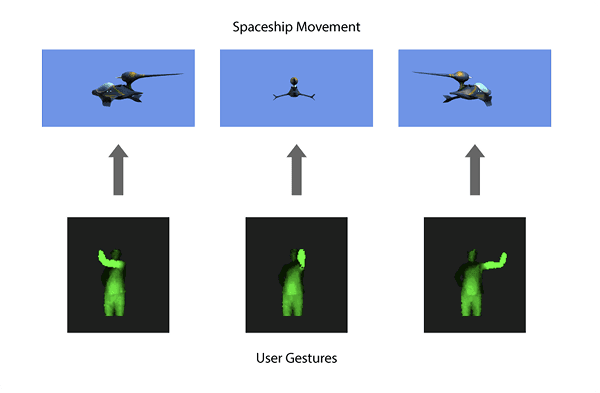
Ship movement mapping — arm gestures to directional controls
Understanding Kinect Sensors
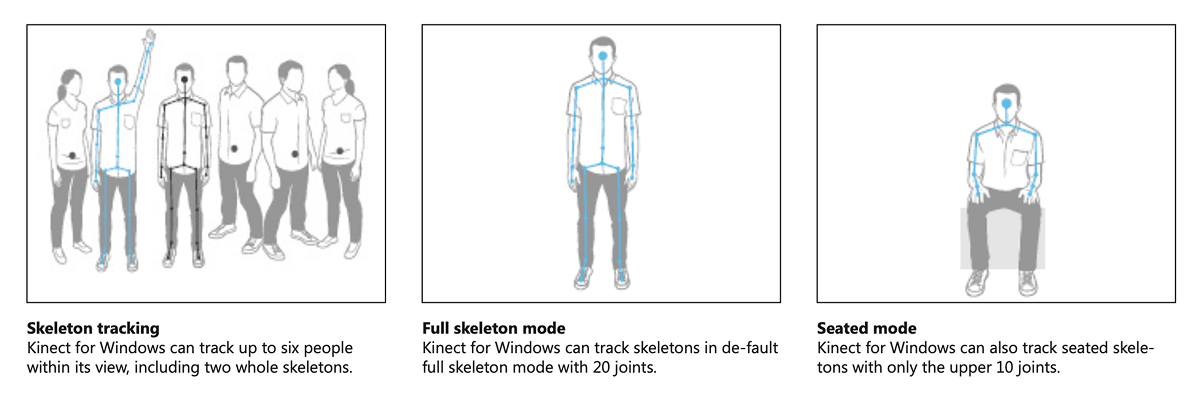
Microsoft Kinect sensor — depth sensor, RGB camera, multi-array microphone, full-body skeleton tracking
Technology & Game Engine Selection
After evaluating multiple options, Microsoft XNA Game Studio was chosen due to:
Compatibility with Windows XP and later versions.
Customisability through scripting and C# support.
Seamless integration with Microsoft Kinect SDK, enabling precise gesture tracking.
Why Kinect?
Kinect's depth sensor, RGB camera, and multi-array microphone enabled full-body tracking — making it ideal for gesture-based gaming.
It could track up to six players and provide real-time motion recognition.
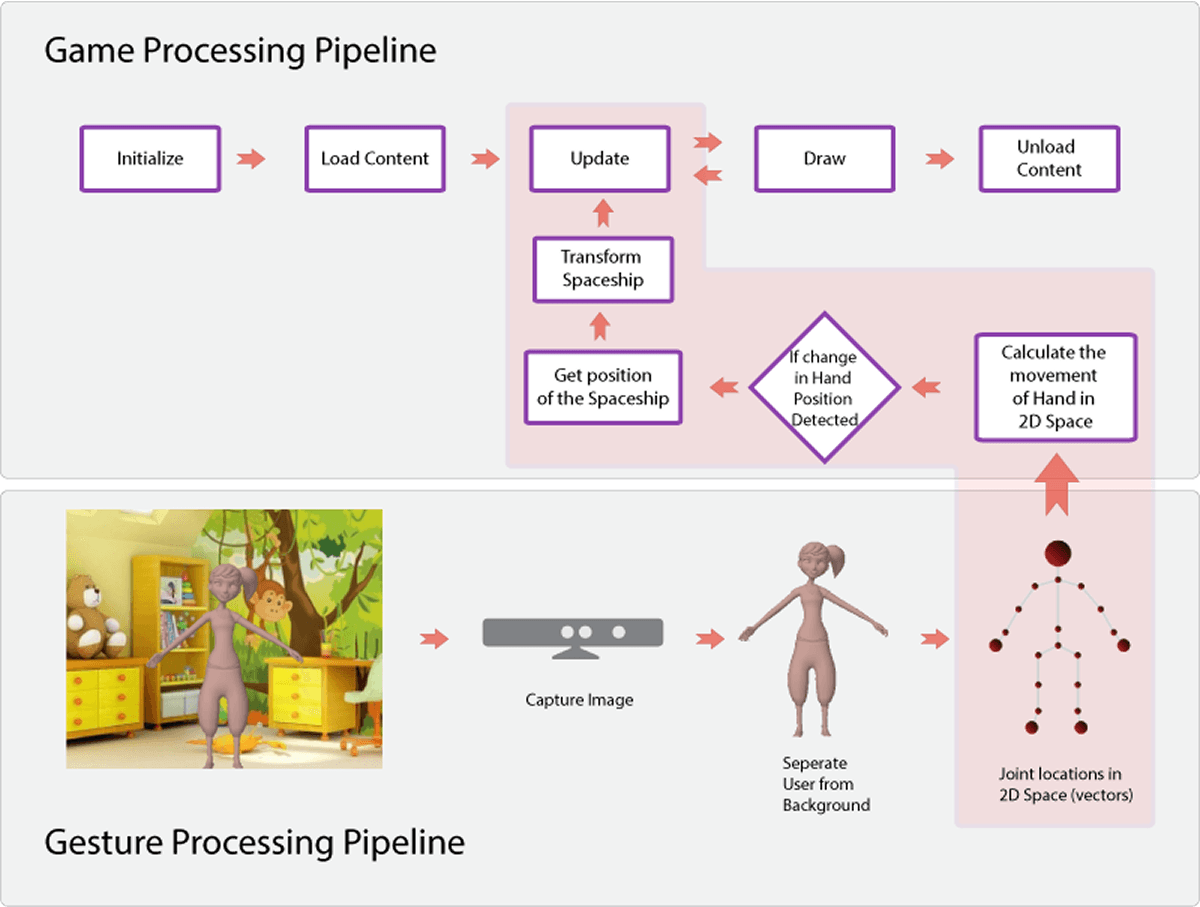
Gesture processing pipeline — Kinect SDK → gesture recognition → game engine → player feedback
Prototype 1 — key findings
Gesture tracking worked But movement felt rigid and unnatural — lacked fluid spaceship control.
Latency issues Early testing revealed latency in gesture recognition — required refinements in sensitivity and tracking range.
Age-specific challenges Younger children struggled with wide-arm gestures — adjustments in movement detection were needed.
Prototype 2
Gameplay Refinement
Key changes in Prototype 2
Expanded gesture controls for better spaceship movement.
Transitioned from XNA to Unity 3D for better asset management and visualisation.
Refined motion tracking for more realistic 3D space navigation.
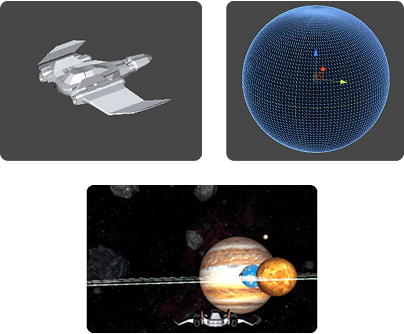
Prototype 2 — Unity 3D environment with solar system, planets, asteroids, and space fog
Game world components
Objects Sun, planets, spaceship, asteroids, space fog, background sky — each with defined properties.
Attributes Each object had properties (e.g., the Sun was stationary and a light source; planets moved in fixed orbits).
Internal Relationships Defined how objects interacted — the spaceship collides with planets if too close; asteroids create obstacles.
Environment 3D space setting with starfield, nebulae, and galaxies — the Sun providing dynamic lighting across the scene.
Prototype 1 — Carried Over
Extend arms forward → Move forward · Move extended arms left/right → Turn spaceship left/right
Newly Added
Extend arms downward → Pitch down · Extend arms upward → Pitch up
Movement Refinements
Introduced Yaw, Roll, and Pitch — making spaceship movement significantly more fluid and natural
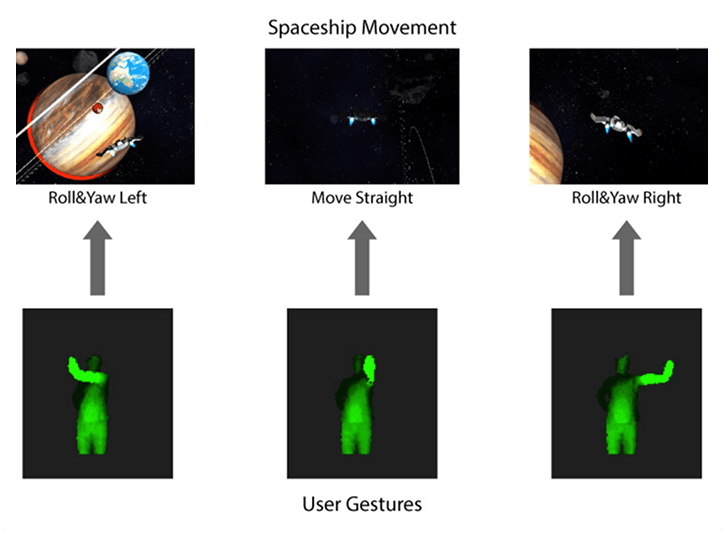
Gesture set 1 — forward movement and yaw controls
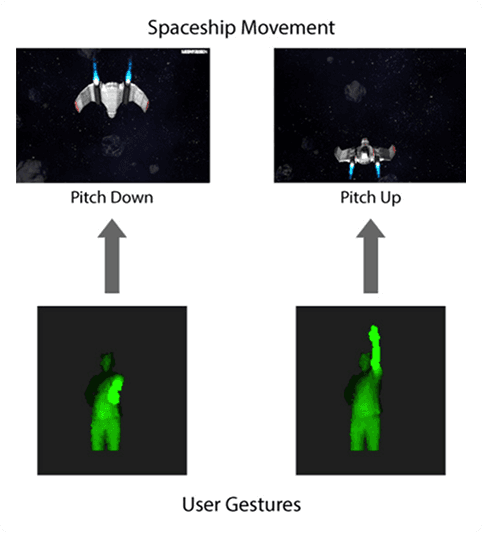
Gesture set 2 — pitch up/down and roll controls
Prototype 2 — findings and next steps
Achievement Realistic spaceship movement achieved with new gesture mappings.
Achievement Solar system simulation nearly complete — asteroid belt addition pending.
Gap Players felt directionless in 3D space — mini-map feature needed.
Gap Some gestures weren't intuitive for younger children.
Gap No UI system for statistics — speed, time remaining, next target.
Prototype 3
Refining Gesture Controls & Spaceship Movement
Forward Movement
Initially mapped to extending one arm forward — refined to holding both arms forward (like gripping a steering wheel) for improved speed control.
Turning Left / Right (Yaw & Roll)
Early versions used arm movements for directional control. Final iteration adopted swaying motions left and right for more natural navigation.
Pitching Up / Down
Initial hand movements proved unintuitive. Finalised using the Psi Pose (raising arms up/down) for enhanced accuracy and ease of use.
Shooting — New Feature
A shooting mechanic was introduced to clear asteroid obstacles. Mapped to extending arms forward with a flapping bird motion (the Phoenix metaphor).
Gesture controls & spaceship movement refinements — click to view full screen
Final Iteration
UI & Gesture Refinements
Home Screen & Training Mode Users could now select Start (play the game) or Train (learn spaceship controls) — reducing onboarding friction.
HUD — Heads-Up Display Real-time information: time remaining, speed gauge, next destination — all surfaced without cluttering the 3D view.
Mission-Based Navigation Players followed diamond blips near planets to reach target destinations — solving the 'directionless' problem from Prototype 2.
End Conditions Game ended when time ran out, spaceship was destroyed, or all objectives were completed.
UI Design
UI & Typography Enhancements
The game's visual identity went through a deliberate UI overhaul — improving button placements, information layout, and typography choices. Two typefaces were selected for the final design: Bitshumishi as the primary font for all titles and on-screen text, and 7-Segment for in-game numeric values like speed and time. The colour scheme was initially orange/yellow but was revised to blue — informed by a colour analysis of contemporary sci-fi games and films — creating a more authentic modern sci-fi aesthetic.
Bitshumishi Primary typeface — used for all game titles, menus, and body text throughout the interface.
7-Segment Secondary typeface — used exclusively for numeric in-game values: speed gauge, countdown timer, and distance.
Colour Scheme Shifted from orange/yellow to blue — a colour analysis of sci-fi games and films confirmed blue as the dominant, authentic sci-fi palette.
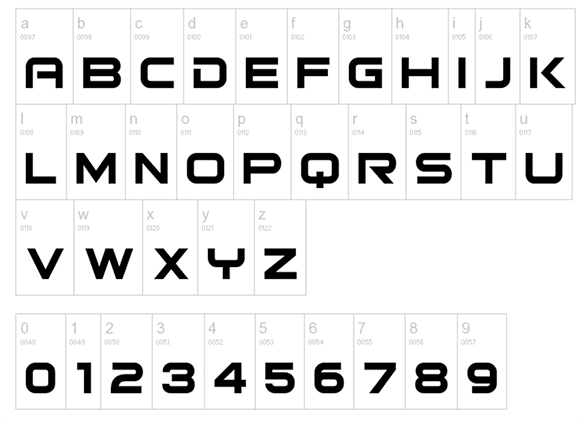
Bitshumishi — primary font for all game titles and text
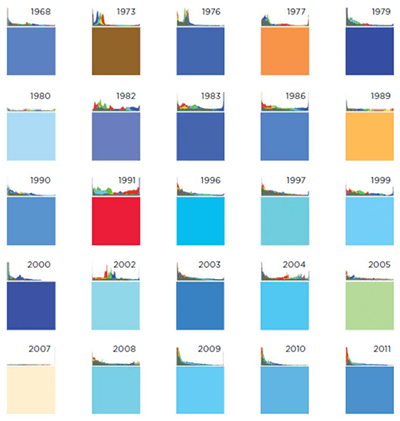
Colour analysis of UI elements used in games and movies
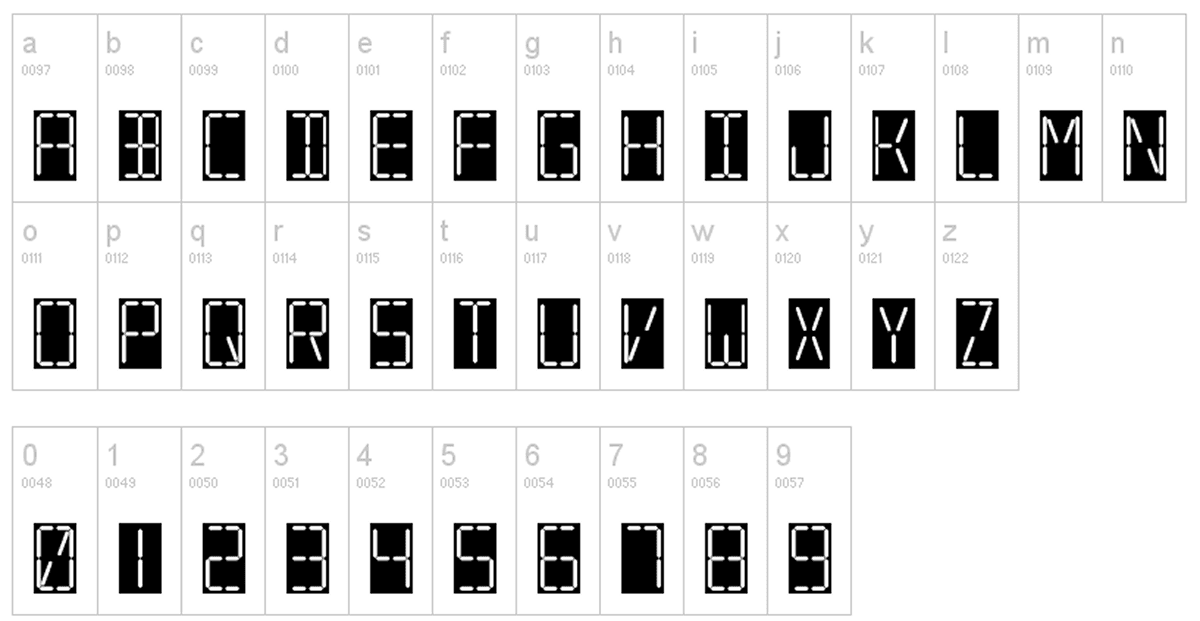
7-Segment — secondary font for in-game numeric values (speed, time)
Before / After
Game UI — Before & After
Before
Initial Game Screens
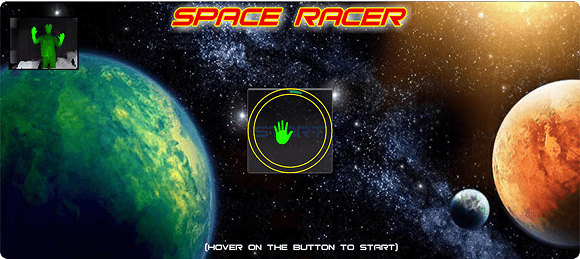
Before — Home Screen: gives user option to Start the game
After
Refined Game Screens
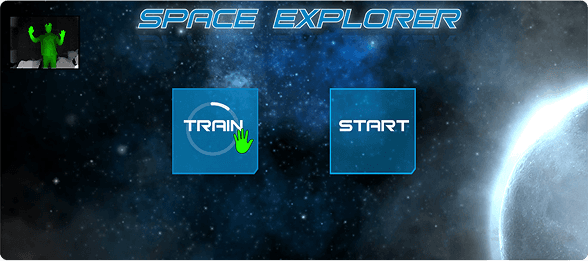
After — Home Screen displaying Train and Start buttons
User Testing and Feedback
Participants
Children aged 9–15 tested the game across sessions
Age Groups
9–11, 11–13, and 13–15 — each with distinct interaction patterns
Evaluation Areas
Gesture comprehension, game mechanics, engagement, and learning retention
User testing sessions — children aged 9–15 playing Space Explorer at Nehru Planetarium
Key findings from user testing
Gesture learning Kids quickly learned and performed gestures — especially after observing others playing first.
Engagement The realistic simulation and interactive elements kept kids engaged throughout the session.
Educational value Kids remembered planet names and facts after playing — confirming the edutainment model worked.
Mini-map underutilised Kids relied more on planet labels for navigation than the mini-map — layout needed rethinking.
Testing nuances
Age differences Younger kids (7–9) struggled with the pitching gesture — requiring additional practice and simplified controls.
Group dynamics Kids often collaborated, guiding each other through the game — highlighting the importance of multiplayer support in future iterations.
Technical issues Some users experienced lag during peak usage — prompting performance optimisation work.
Final Design
The final game allowed players to control a spaceship using intuitive gestures, explore a realistic 3D solar system, and complete challenges within a time limit.
Gesture Controls
Simple, natural gestures for movement, turning, pitching, and shooting — refined across three prototype iterations.
Educational Content
Planet info cards with facts about size, distance from the sun, and more — surfaced contextually during gameplay.
Immersive Graphics
High-quality visuals, a starry backdrop, dynamic lighting, and nebulae created a genuine sense of wonder.
Design highlights
Educational alignment Game content carefully curated to align with school curricula — ensuring relevance for teachers and parents.
Accessibility Gestures designed to be inclusive, accommodating children of different physical abilities and age groups.
Scalability Designed to run on low-cost hardware — making it accessible to other museums and educational institutions beyond Nehru Planetarium.
Concept Video — Space Explorer prototype overview
Testing Video — children playing Space Explorer at Nehru Planetarium
Impact and Takeaways
Engaging Kids
Making learning about space genuinely fun and interactive
Encouraging Collaboration
Kids naturally worked together to complete challenges
Curriculum Alignment
Reinforcing concepts taught in school through play
Lessons learned
Simplicity is key Intuitive gestures and clear objectives are crucial for engaging young users — overcomplicated controls create barriers, not experiences.
Balance education and fun Edutainment works best when learning is seamlessly integrated into gameplay — the moment education feels like a lesson, kids disengage.
Iterate and test relentlessly Each of the three prototypes revealed something the previous one could not — user feedback is irreplaceable for refining interaction design.
“The Space Explorer project demonstrated how gesture-based technology can revolutionise museum learning — combining interactive gameplay with educational content to create an experience that deepened children's understanding of space and astronomy.”— Debashish Sahu, NID Diploma Project