
IMI Campaign
Integrated Campaign Management System
Redesigning an existing muti-channel campaign management platform
USERS
Marketing campaignmanagers who want toincrease the campaignROI & improveCampaign Mgmt.experience.
MY ROLE
-
Project Lead,
-
Requirement Analysis,
-
User Research,
-
Competitive Research,
-
Interaction Design,
-
Visual Design.
TEAM
-
2 Interaction Designers
-
1 Visual Designer
DURATION
16 months
(Sep 2017 - Jan 2019)
Project Plan and Detailed Timeline

Problem Space
What are the core functions of the Campaign Management Tool?
Built for the digital enterprise, this tool is trusted with the deployment of millions of cross-channel communications. The platform's mobile-first capabilities optimize campaigns for the smartphone, with enterprises using SMS, App Push, MMS, and Email, to maximize performance throughout the customer lifecycle.
Famed for their Priority Campaigns to create one of the most engaged customer bases in various domains.

This tool is an integrated campaign management system. It offers a way for enterprises to instantly innovate, switching from poorly-integrated disparate systems to joined-up cross-channel communications that use the latest mobile-first capabilities.
From location-aware messaging to instant access to new mobile channels, IMIcampaign's features work together to increase campaign ROI and improve campaign CX.
Product Analysis and User Research
1
Product Manager
2
Account Managers
4
Operations Staff
5
Project Managers &
Lead Developers
Stakeholder Consultation & Module Analysis
To gain a comprehensive understanding of the existing platform's limitations, we initiated the project with a deep-dive product analysis centered on stakeholder interviews. By speaking directly with various members of the team across the organization, we were able to capture qualitative insights that defined our path forward.


Synthesizing the Findings
By documenting these insights section-by-section, we moved beyond anecdotal feedback to create a structured list of requirements. This "eye-opening" process of connecting with real-world users and internal experts allowed us to validate the need for a transition toward a more visual, data-driven, and streamlined interface.
Dashboard
User segementation
The system supports a full spectrum of users, from high-level strategy to technical execution:
-
Strategic Leadership (CMO, Marketing Head): Focus on brand alignment and organizational goals.
-
Tactical Management (Campaign Managers): Focus on campaign structure, logic, and performance.
Primary User Goals
The following objectives represent the core needs identified for these personas:
-
Executive Oversight (The "Fish Eye" View): Users require a high-level performance snapshot across various P&Ls and specific Campaign Groups to assess health at a glance.
-
Performance Measurement: Tracking of core metrics including Campaign Statistics, User Engagement levels, and overall ROI to justify spend.
-
Drill-Down Capability: The ability to move from "Top-to-Down" statistics, starting with macro trends and navigating into granular, row-level data.
-
Multidimensional Analysis: Filtering and grouping data by specific marketing channels and custom date ranges to identify seasonal trends and channel efficiency.

Campaign Management System
User segementation
The system supports a full spectrum of users, from high-level strategy to technical execution:
-
Strategic Leadership (CMO, Marketing Head): Focus on brand alignment and organizational goals.
-
Tactical Management (Campaign Managers): Focus on campaign structure, logic, and performance.
-
Operational Management (Operators): Focus on execution, asset uploads, and technical setup.
Primary User Goals
Campaign Lifecycle & Governance
-
End-to-End Management: Comprehensive tools for the creation, editing, and ongoing management of marketing initiatives.
-
Hierarchical Visualization: Clear visibility into the relationship between Campaign Groups, Primary Campaigns, and Follow-up Campaigns to ensure logical flow.
-
The "Who, What, When" Framework: A standardized interface to define target audiences (Who), content/offers (What), and scheduling (When), with full flexibility for mid-flight adjustments.
Organizational Alignment
-
Unified Campaign Calendar: A "Single Source of Truth" that aligns disparate teams around a shared schedule, preventing overlapping messages and ensuring a consistent brand voice.
-
Global-to-Local Unification: The ability to synchronize campaigns across different levels of the organization to deliver a seamless, personalized customer experience.
Content & Asset Enablement
-
Integrated Asset Library: Centralized management for rich media, including message templates, images, video, and audio.
-
Creative Streamlining: Simplifying the process of uploading and associating creative assets directly with specific campaign steps.

User Personas
We zeroed down on these two personas because they represent the two critical pillars of the campaign management lifecycle: strategic oversight and operational execution.
By focusing on Aaron and Marie, the redesign addresses the entire value chain of the product, from data-driven decision-making to the technical rollout of content.
Aaron Loeb was selected to represent the "Strategic Stakeholder" viewpoint. His persona highlights the need for a dashboard that moves away from compartmentalized data toward high-level, aggregated visualizations that clearly define ROI.

Marie Walter, on the other hand, represents the "Power User" or operational executor. Her inclusion ensures the redesign solves for "boots on the ground" issues, such as the friction caused by constant modification requests and the technical limitations of the existing form-based system.

Together, these personas allow us to bridge the communication gap between leadership and operations, ensuring the new IA serves both the person who analyzes the data and the person who builds the campaigns.
Ideation and Solutioning
Solution Approach
This structured, iterative design process is essential for a project of this scale because it bridges the gap between complex technical requirements and the end-user's mental model. By moving through stages like Opportunity Areas and Affinity Mapping, the team can synthesize scattered stakeholder feedback into a cohesive strategy before any code is written.
.png)
Why This Process is Required?
-
Managing High Complexity The shift from a rigid form-based system to a modular, node-based Visual Campaign Builder requires a deep dive into Information Architecture and Application Flow to ensure all functional dependencies are mapped correctly.
-
Stakeholder Alignment Early-stage Brainstorming and low-fidelity Wireframes act as a "co-designing" tool
-
Risk Mitigation The loop between Wireframes and Usability Testing allowed to identify bottlenecks—such as confusing data visualizations or non-intuitive task flows—early, preventing costly rework during the Visual Design or development phases.
-
Consistency at Scale A defined process leads to a comprehensive Styleguide and Visual Specifications, ensuring that developers can implement complex components like sunburst charts with pixel-perfect accuracy.
Information Architecture
Existing
We initiated the project by conducting a comprehensive audit of the legacy system to map the existing information architecture (IA). By experiencing the product first-hand and exploring critical use cases for both end-users and stakeholders, we established a foundational understanding of the current platform's architecture.

Redefining: Initial Iteration
To align the new structure with user expectations, we performed a card-sorting exercise as part of our primary research. This allowed us to decode the mental models of stakeholders and end-users, ensuring that the high-level IA was rooted in intuitive categorization rather than technical constraints.

Redefining: Final Iteration
Finally, we iterated on this high-level framework to produce a detailed IA and a cohesive application structure. This refined architectural roadmap directly informed the page-level detailing and interaction design, ensuring every element of the final product remained consistent with our research-driven foundation.


Re-designing the Dashboard

Existing
To address the lack of clear performance metrics, we implemented a centralized dashboard as the landing page to provide immediate visibility into campaign health. We began with high-level, block-based wireframes that underwent continuous refinement through iterative stakeholder discussions.
Rationale
These low-fidelity block diagrams facilitated a "co-designing" environment where stakeholders' domain expertise was integrated into every step. This collaborative approach ensured the architecture remained aligned with business goals while demystifying the design process for non-designers.

Result
This process significantly improved stakeholder buy-in. It shifted the conversation from simply comparing generic online templates to a deep understanding of how our unique data models drive each visualization, ensuring the final dashboard was both functional and strategically relevant.


Data visualizations
To deliver a comprehensive data narrative, we curated a selection of visualizations that translate complex datasets into actionable insights. By moving away from compartmentalized tables, we provided a suite of tools designed to reveal structural relationships, temporal trends, and operational bottlenecks.
Visualizing Composition and Proportions
We utilized Donut Charts, Half Donuts, and Sunburst Charts to represent "parts-of-a-whole" relationships. While donuts provide a quick snapshot of single-level distributions, the Sunburst Chart serves as a powerful extension for the Marketing Manager, allowing for the visualization of multi-level hierarchies within a single view.

Analyzing Trends and Time-Series Comparisons
To track performance over time, we implemented Line Charts and Area Charts. These allow both the Marketing Manager and the Operations Team to compare multiple data points—such as engagement versus spend—across specific date ranges, making it easier to identify seasonal trends or shifts in user behavior.

Identifying Bottlenecks with Stacked Comparison
The Funnel Chart was integrated as a primary tool for stacked comparison. By visualizing the conversion journey, this chart helps stakeholders identify exactly where potential drop-offs occur, highlighting specific problem areas within the organization's marketing processes that require immediate optimization.

Visual Campaign Builder
We transitioned the core campaign logic from a restrictive "Who, What, When" form-based interface into a dynamic Visual Campaign Builder. This transformation was achieved by deconstructing monolithic data entries into a flexible, node-based system.
Deconstructing Atomicity (Nodes)
We analyzed the existing campaign forms to identify their most basic, functional components. By breaking these down into "Nodes," we transformed rigid input fields into discrete, modular units. This atomic approach allows users to treat each campaign action—such as an SMS trigger or a segment filter—as an independent building block.

Defining Node Properties
For each individual node, we designed a specific properties panel based on its functional requirements. We identified the critical values and configurations needed for each unit, ensuring that whether a user is setting an SMS message or defining a target audience, the interface only surfaces relevant, actionable parameters.

The Interactive Canvas
To bring the campaign to life, we integrated these nodes onto a centralized digital canvas. By mapping the logical dependencies and relationships between each node, we enabled users to visualize the entire campaign flow. This spatial representation allows for the creation of complex, branching journeys that were previously impossible to manage within a standard form.


Setup Wizard
To bridge the gap between a blank canvas and a finished journey, we introduced an intelligent Setup Wizard. Based on the user's initial objectives—such as "Promotion" or "Instant Deployment"—the wizard generates a boilerplate template. This provides a pre-configured starting point that users can simply refine, significantly reducing the "blank page" fatigue and accelerating the time-to-launch.

Listing Pages (P&L, Campaigns & Deployments)
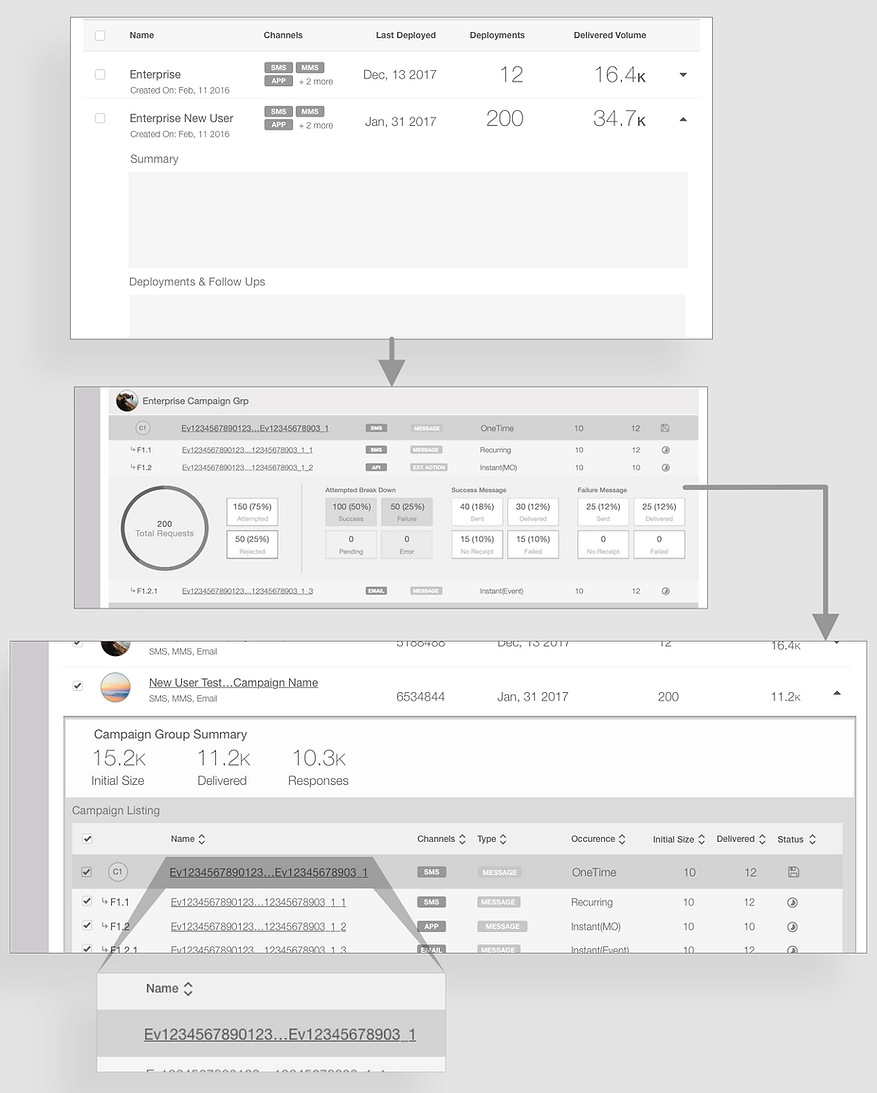
To accommodate the platform’s data-heavy nature, we implemented structural adaptations that balance deep information density with visual clarity.
Hierarchical Data Architecture (P&L → Campaigns → Deployments)
We established a clear three-tier hierarchy to organize the massive volume of information.
Campaigns are organized into Campaign Groups, which act as the parent container for various Deployments, such as new launches and follow-up sequences.
The interface utilizes a nested listing approach: the primary view displays high-level metrics like contact size and total responses, while an expandable inner table reveals granular deployment-level details (name, channel, status, etc.).
This "drill-down" logic ensures that the lowest level in the chain—the deployment—remains accessible without cluttering the strategic overview.
Smart Truncation
A significant challenge arose with Deployment Names, which frequently ranged from 64 to 128 characters, threatening to break the tabular layout.
To solve this without losing the most critical identifiers, we implemented middle-weighted ellipses.
By preserving both the beginning and the end of the string (e.g., fifteen_charac...teen_characters), users can still identify unique campaign versions or dates often appended to the end of a name, maintaining data integrity within a fixed-width UI.
Final Designs

Dashboard: Monitoring Campaigns
This section of the tool describes out how a manager would login to the tool and make informed decisions using the real-time graphs and tabular data to drill down to the most granular detail about a campaign.
Visual Campaign Builder: Provisioning Campaign
This section of the tool shows how a manager would go about and create a campaign using the visual builder tool.
Design Deliverables
A design’s success is measured by the clarity of its execution, and as the saying goes,
"A good design is only as good as its documentation."
Wireframe Specification Document
To ensure the design vision was translated accurately into code, we authored a comprehensive Wireframe Specification document. This acted as the definitive technical blueprint, meticulously detailing every UI component, data visualization, and screen-level interaction.
Unlike a standard hand-off, this document went beyond visuals to define the "logic" of the platform—specifying the ideal data formats and expected outcomes for every complex table and chart.
This specification served as the primary source of truth for the UI development team. By providing clear interaction guidelines and behavior rules, we minimized development guesswork, ensured a consistent user experience across all modules, and facilitated a seamless transition from wireframe to functional product.
Visual Specification Document
We also developed a rigorous Visual Specification document to bridge the gap between design and front-end engineering. This document moved beyond aesthetics, providing a high-fidelity roadmap of the visual treatment for every component, graph, and chart within the system.
To ensure the hand-off was truly developer-friendly, we translated visual styles into precise technical values. By defining specifications in pixels (px) and percentages, we provided the engineering team with assets they could implement directly into CSS, eliminating the need for interpretation or guesswork.This culminated in a comprehensive Styleguide, a single source of truth that unified the platform's visual identity.
It detailed the exact color palettes, shadow depths, and specific height and width constraints for all interface elements. By codifying these visual standards, we ensured that the "refreshing modern UI" remained consistent, scalable, and pixel-perfect across every module of the application.
Testing and Evaluation
This section covers the critical validation phase, where our design hypotheses were tested with real users, and the resulting business value was measured and quantified. The outcomes confirmed that the redesign delivered a significant positive impact on both user experience and the company's bottom line.
Usability Testing and User Feedback
We conducted usability tests with 10 different users, who used to drive, provision and execute campaigns on daily basis.
As the users were key people within IMImobile's existing clientele situated in a different geographic location; we conducted remote usability test sessions with users considering both the budget & the project time-line.
The reaction to the redesigned platform was overwhelmingly positive, with users praising the newfound clarity, structure, and modern interface.
Following are the some of the key statements given by the users & stakeholders:
Dashboard
-
Each and every page were much richer in-terms of the graphs & data visualizations from the very first page of the Dashboard.
-
Full control over displayed information and ability to drill down to very basic on the basis of Hierarchy, Channels and Time.
-
Dynamic and relevant graphs which can be directly downloaded and archived for client consumption (earlier they used to do a lot of excel work for the graphs to look good).
-
The navigation is very clean, nesting & hierarchy is much clear and takes away the need of searching through keyboards in most of the cases. They were now sure about how and where a certain information was located.
'Each and every page were much richer in-terms of the graphs & data visualizations...
full control over displayed information and ability to drill down.'
Campaign Management - Visual Campaign Builder
-
New interaction experience with the canvas and draggable nodes is a most usable & wow factor.
-
Clear compartmentalization of information in specific nodes with configurable properties and retaining the old connotation of Who, What & When.
-
Ability to visualize the campaigns and trace the node which might need little tweaking without digging through a long series of click able form/wizards.
-
The hidden menus and options are now available through the click of respective node elements as overflow menu in the canvas.
'New interaction experience with the canvas and draggable nodes is a most usable & wow factor... Ability to visualize the campaigns and trace the node which might need little tweaking without digging through a long series of click able form/wizards.'
'The navigation is very clean, nesting & hierarchy is much clear and takes away the need of searching through keyboards in most of the cases.'
Quantified Business Impact
The design overhaul delivered tangible, measurable business outcomes that transformed the platform's value proposition.
Time-to-Navigate
Reduced by 50%, allowing users to find information and complete tasks much faster.
Time-to-Create Campaigns
Decreased by 30%, representing a significant boost in operational efficiency for marketing teams.
Hand-off Time
Reduced by a massive 45%, streamlining collaboration between different teams and roles.
Accelerated Client Autonomy
The highly intuitive design significantly lowered the learning curve, empowering clients to transition from our managed services to self-sufficient, in-house operations far more rapidly.
Marketing Positioning
The design overhaul delivered tangible, measurable business outcomes that transformed the platform's value proposition.
Competitive Standing
The redesign completely transformed the product, elevating its user experience and feature set to effectively compete with major industry players like Adobe Campaign Manager and Salesforce.
Time-to-Create Campaigns
4-5 new enterprise clients including major telecommunications companies (O2, Cingular UK).
Acquisition
~8 months post-launch, Cisco acquired IMImobile. The redesigned campaign tool was a key differentiator, the product still stands with the designs work we did.
Conclusion
What worked well!
-
Building stakeholder trust before demanding user access rather than insisting on direct user research immediately, I demonstrated value through internal collaboration first. This built credibility that eventually opened doors to actual customers.
-
Advocating for fundamental change over incremental improvement. The visual builder wasn't the safe choice—it required rebuilding core functionality. But research supported that optimizing the existing form-based system would only marginally improve a fundamentally flawed paradigm.
-
Designing for handoff from day one knowing our engagement was temporary, I prioritized documentation and systematic design decisions that could survive and scale without us.
-
Maintaining the "Who, What, When" mental model rather than inventing entirely new concepts, we preserved familiar terminology while transforming the interaction paradigm. This reduced learning curve for existing users.
Key learnings
-
Complex enterprise tools benefit from visual paradigms, when users already think in flowcharts and diagrams, forcing them into linear forms creates unnecessary cognitive translation. Meeting users' mental models reduces training and errors.
-
Senior design leadership means advocacy, this project reinforced that impact often comes from making the case for the right solution, not just executing what's requested. Research-grounded advocacy for the visual builder created outsized business value.
-
Design systems are force multipliers the investment in systematic documentation paid dividends well beyond our engagement, enabling consistent evolution and expansion to new products.